Contribute to the DSpace Development Fund
The newly established DSpace Development Fund supports the development of new features prioritized by DSpace Governance. For a list of planned features see the fund wiki page.
⛔ Requirements
Before to proceed with the development of DSpace, you need some software requirements: Installing DSpace#BackendRequirements (stop at the deploy feature, because we don't need to deploy anything  ).
).
🍃 SpringBoot
The SpringBoot feature will allow to execute the application right inside your IDE without the need to deploy it.
✍️ Configuration
To run DSpace with SpringBoot directly in your favorite IntelliJ IDE version, you just need to configure it as a standard Java Application.
Configure standatd Java application configuration: (Run -> Edit Configurations)
Add a new configuration ( + or Alt+Insert) of
Applicationtype.Check that the JDK selected is Java 17
Check that the classpath (
-cp) argument is set correctly with theserver-bootproject- Check that the main class is
org.dspace.app.ServerBootApplication - Check that the working directory is set to the path where DSpace is installed (use the same value as
dspace.dir). Check that you have correctly placed the
dspace.dir(path of directory where dspace is installed) andlogging.dir(logging configuration) environment variables:--dspace.dir={path-to-install-dir};--logging.config=file://{path-to-logging-file}By default, the logging configuration file is located at
{path-to-install-dir}/config/log4j2.xml.
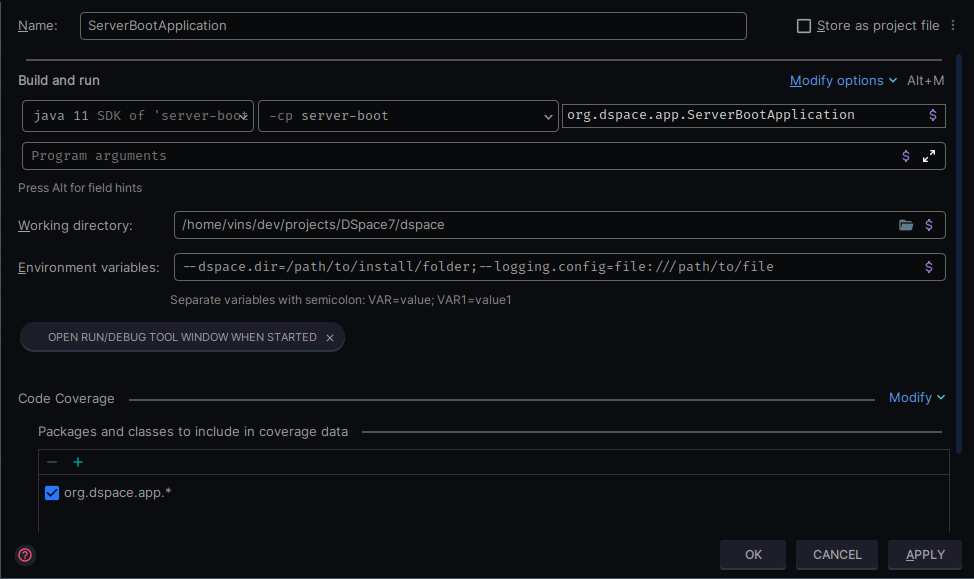
3. Congratulations  !
!
Now you should have a running configuration that is using SpringBoot, just press on RUN  !
!
Overview
Content Tools
All content on the LYRASIS Wiki is licensed under the CC BY (Attribution) license , unless otherwise noted.