All Versions
DSpace Documentation
Unreleased Documentation
This documentation is unreleased and still in development. It may describe features which are not yet released in DSpace.
Looking for another version? See all documentation
In DSpace, Workspace Items may be visible and accessible to:
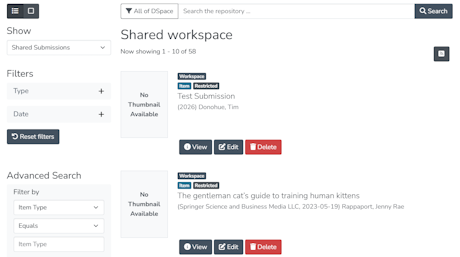
The submitter finds their Workspace items in the MyDSpace dashboard under the default "Your Submission" option. Other EPersons allowed to see Workspace items submitted by others will find those items under the "Shared submission" option.
By default, Workspace items are accessible to administrators of the collection where they are going to be placed.
When a Collection has the "Shared workspace" setting enabled (from the Collection's "Edit Metadata" tab), this allows all Workspace Items within this collection to be shared submissions among all other submitters to that collection. For example, if one submitter starts a submission in that collection, all other submitters to that collection will have access to it from the "Shared submission" option on their MyDSpace page.
Additionally, it's possible to provide shared submission access to authors of the submission, even if they are not submitters to that Collection. By configuring the sharedWorkspaceAuthorMetadataFields bean in discovery.xml, it is possible to define which metadata of the Workspace Item must be evaluated to share permissions and give access to other EPersons.
Requirements for the metadata fields:
dspace.object.owner metadata) those Researcher ProfilesOut of the box, the logic relies on dc.contributor.author and dc.contributor.editor metadata:
<util:list id="sharedWorkspaceAuthorMetadataFields" value-type="java.lang.String">
    <value>dc.contributor.author</value>
    <value>dc.contributor.editor</value>
</util:list>
This configuration is located in dspace/config/spring/api/discovery.xml.
A new Workspace item (Publication) is created, submitted by user John Doe, having:
Both "Jane Smith" and "Carlos Prontera" researchers, when logged into the DSpace instance, will see this Workspace Item among "Shared Submissions" in their MyDSpace dashboard.
| Role | View | Edit Metadata | Delete | Deposit | Upload Files | Accept License |
|---|---|---|---|---|---|---|
| Original submitter | Yes | Yes | Yes | Yes | Yes | Yes |
| Collection submitter group member (shared workspace) | Yes | Yes | Yes | Yes | Yes | Yes |
| Co-author + submitter of same collection | Yes | Yes | Yes | Yes | Yes | Yes |
| Co-author + submitter of different collection | Yes | Yes | No | No | No | No |
| Co-author not in any submitter group | Yes | Yes | No | No | No | No |
| Collection administrator | Yes | Yes | Yes | Yes | Yes | Yes |
Currently co-authors of a Workspace Item cannot delete or deposit it. They can only edit its metadata.
All content on the LYRASIS Wiki is licensed under the CC BY (Attribution) license , unless otherwise noted.