The synchronization process with ORCID allows to update the user publications, fundings and profile on ORCID after changes on DSpace CRIS items. To perform this synchronization, however, the user must:
has registered on DSpace CRIS via ORCID
or has already connected his researcher profile with his ORCID account through the ORCID section present in the user's profile in DSpace CRIS. With this process the user from DSpace will be redirected to the ORCID website to log in and later grant the specific permission asked for.
A profile that can be synchronized with ORCID must therefore have the following metadata:
person.identifier.orcid: the orcid id of the account on ORCID related to the researcher profile
cris.orcid.access-token: the access token provided by the ORCID token url
cris.orcid.refresh-token: the refresh token
cris.orcid.scope: the scopes related to the permissions that the user has granted
Since DSpace-CRIS version 2022.02.00 (05th Oct 2022) this feature is aligned with ORCID integration available in DSpace and some metadata were migrated from the cris schema to the dspace schema (ref. ORCID Integration) |
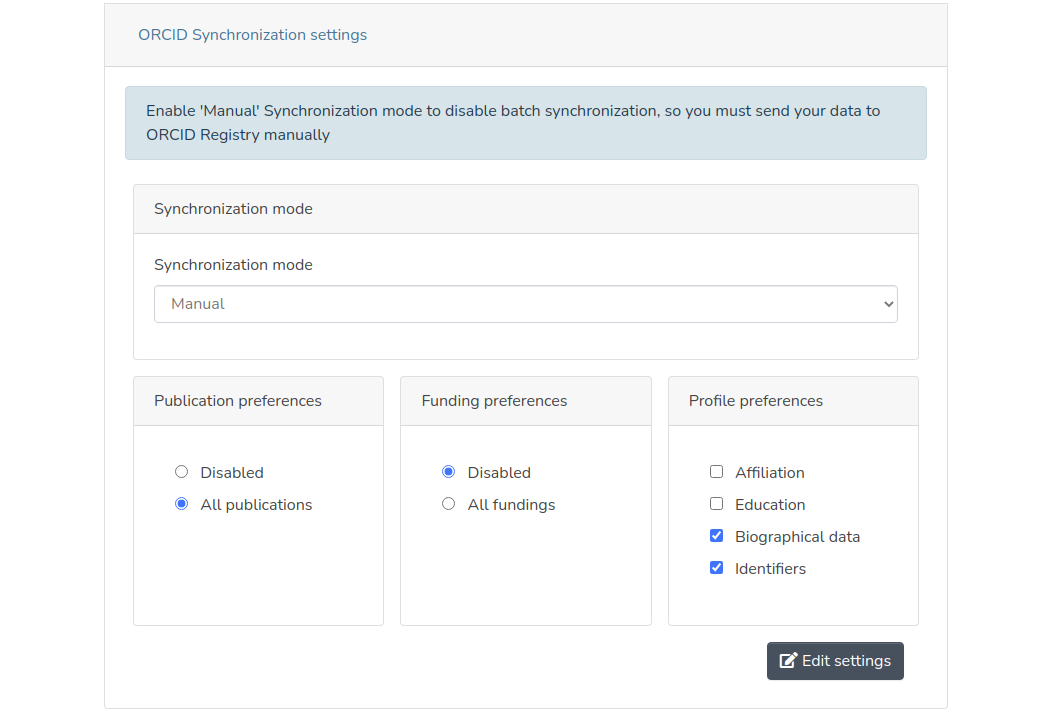
It is possible to view and edit the synchronization modes and settings using the specific box under the ORCID tab. Like the ORCID tab itself and the other boxes in it, this section of the item can only be viewed by the owner of the item and only if an ORCID account was already linked to the viewing shown.
User specified synchronization settings are stored in the following metadata of the researcher profile item:
cris.orcid.sync-mode: the synchronization mode
MANUAL: the synchronization on ORCID will be performed only when the user forces it manually
BATCH: the synchronization on ORCID will be done by a scheduled batch but can be also forces manually by the user
cris.orcid.sync-publications: the configuration of the publications synchronization. Can have a single value among the following:
DISABLED: the synchronization of the publications is disabled
ALL: synchronize all the publications related to the profile
cris.orcid.sync-fundings: the configuration of the fundigs synchronization. Can have a single value among the following:
DISABLED: the synchronization of the fundigs is disabled
ALL: synchronize all the fundigs related to the profile
cris.orcid.sync-profile: the configuration of the profile synchronization. Can have many values among the following:
AFFILIATION: synchronize all the person’s affiliations
EDUCATION: synchronize all the person’s educations and qualifications
IDENTIFIERS: synchronize all the person’s identifiers
BIOGRAPHICAL: synchronize all the person’s biographical information (other names, country keywords etc ...)
The update of the synchronization preferences is done with a PATCH request to the endpoint /api/cris/profiles/<:eperson-uuid>, performing a REPLACE operation with one of the following paths:
/orcid/mode - to update synchronization mode
/orcid/publications - to update the preference relative to the publications synchronization
/orcid/projects - to update the preference relative to the projects synchronization
/orcid/profile - to update the preference relative to the profile synchronization; it is possible to specify multiple values using ',' as separator.
The items to be synchronized with ORCID, according to the synchronization configuration set by the user, are put in a queue of resources to be sent to ORCID to insert or update publications, fundings and profile informations. Once the user has forced sending to ORCID or the synchronization batch has done it, the items already synchronized will be removed from the queue.
The queue is modeled through the orcid_queue table, and each entry of that queue is therefore represented by a record of that table. Each record represents an item or a metadata to be synchronized on ORCID, with the reference to the item of the owner researcher profile. The columns of the orcid_queue table are:
id → id of the record
owner_id → the uuid of the profile item
entity_id → the uuid of the entity item to be synchronized; if the record refers to profile’s sections, the entity_id is equals to the owner_id
description → the record description
record_type → the type of record. If the record refers to an entity distinct from the profile then the record_type represents the entity type of the item to be synchronized, otherwise it indicates the type of section of the profile to be synchronized. In the latter case, the possible values are:
AFFILIATION → related to a nested metadata group of affiliation
EDUCATION → related to a nested metadata group of education
QUALIFICATION → related to a nested metadata group of qualification
OTHER_NAMES → related to the profile’s other name
COUNTRY→ related to the profile’s country
KEYWORDS → related to the profile’s keywords
EXTERNAL_IDS → related to the profile’s external identifiers
RESEARCHER_URLS → related to the profile’s researcher urls
operation → the operation’s type (INSERT, UPDATE, DELETE)
metadata → if the record refers to the synchronization of a section of the profile, that column the signature of the metadata referenced by the record; the signature is generated using a bean of type org.dspace.app.orcid.service.MetadataSignatureGenerator (see the dedicated section for further details)
put_code → in case of update or delete it indicates the entity to update/delete in the ORCID registry
attempts → number of push attempts made by the batch procedure
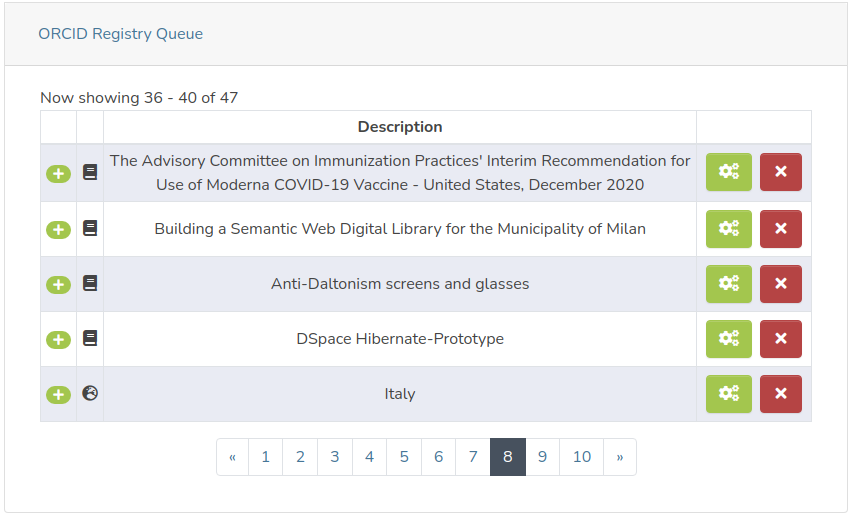
The records in the ORCID queue associated with a specific profile can be viewed in the specific box under the ORCID tab on the item page. From this section you can remove the records from the queue or force synchronization with the ORCID registry. For further details on manual synchronization, refer to the specific section of this page.
After each attempt to push data from DSpaceCRIS to the ORCID registry, a record is inserted in the orcid_history table with the detail of the response coming from ORCID. In particular, in addition to the columns present in the orcid_queue except the attempts column, the orcid_history also has the following columns:
response_message → the body of the response from ORCID
status → the status of the response from ORCID
timestamp_last_attempt → timestamp calculated during the push attempt
The ORCID queue is in most cases populated by a specific consumer implemented by the class org.dspace.app.orcid.consumer.OrcidQueueConsumer which, when an archived item is modified, checks if it is necessary to update the queue of some profile connected to ORCID . In particular:
if the modified item is a profile (Person item), check if it is linked to ORCID and if necessary recalculate the queue for each section of the profile. To do this, the metadata associated with the various sections of the profile are obtained, their signature is calculated and using that signature it is checked whether there have been any changes compared to what is present in the orcid_history.
if the modified item is an entity of the supported type (Publication or Funding) then it is checked if among the item’s metadata there are any related to a profile linked to ORCID. If a profile is identified, then a record is added to the queue, if not already present for the pair profile id/entity id. To understand if the operation associated with this new record must be an insertion rather than an update, a search in the orcid_history for an entry relating to the same entity for the same owner is done: if this record is present, the put_code present in the record of the orcid_history is set in the new queue record and the operation will be UPDATE, otherwise the operation will be INSERT.
The ORCID queue is also populated on two other occasions, in addition to the OrcidQueueConsumer:
When a publication or funding associated with a profile linked to ORCID is deleted. In this case a DELETE record is inserted with entity id null and putCode the one taken from the orcid history.
When publication/funding preferences are updated.
Publications can be synchronized with the ORCID registry to create/update Work entities. The conversion between the items representing the publications and the works in xml format to be sent to the ORCID register is managed by the bean org.dspace.app.orcid.model.factory.impl.OrcidWorkFactory.
This bean use a dynamic configuration of the metadata to be read, implemented through the class org.dspace.app.orcid.model.OrcidWorkFieldMapping.
The mapping between the publication’s metadata fields and the Work attributes present in the ORCID registry can be configured through the following properties:
orcid.mapping.work.title → the work’s title
orcid.mapping.work.sub-title → the work’s sub-title
orcid.mapping.work.short-description → the work’s description
orcid.mapping.work.publication-date → the work’s publication date
orcid.mapping.work.language → the work’s language
orcid.mapping.work.language.converter → the name of a bean of the class org.dspace.util.SimpleMapConverter that allows to map the publication’s language stored in DSpace-CRIS to the languages supported by ORCID
orcid.mapping.work.journal-title → the work’s journal title
orcid.mapping.work.type → the work’s type
orcid.mapping.work.type.converter → the name of a bean of the class org.dspace.util.SimpleMapConverter that allows to map the publication’s type stored in DSpace-CRIS to the types supported by ORCID
orcid.mapping.work.citation.type → one of the citation type defined in the keys of the map defined for the attribute of the OrcidWorkFieldMapping named citationCrosswalks
orcid.mapping.work.contributors → the list of metadata associated with the contributors of the publications in the format <metadatafield>::<role>, where role must take on one of the roles allowed by ORCID ( as author, editor, co-inventor etc..)
orcid.mapping.work.external-ids → the list of metadata associated with the external identifiers of the publications in the format <metadatafield>::<type> or $simple-handle::<type>, where
type is one of the available external identifiers (click here for more details)
$simple-handle indicates to use the item handle
orcid.mapping.contributor.email → the work contributors email
orcid.mapping.contributor.orcid → the work contributors orcid
orcid.mapping.work.funding →the funding related to the work
orcid.mapping.work.funding.external-id.type → one of the available funding external identifier type
orcid.mapping.work.funding.external-id.value →the funding external identifier present in the work
orcid.mapping.work.funding.external-id.entity-value →the funding external identifier taken from the funding entity
orcid.mapping.work.funding.url → the funding url taken from the funding entity
Below is an example of a configuration:
orcid.mapping.work.title = dc.title orcid.mapping.work.sub-title = orcid.mapping.work.short-description = dc.description.abstract orcid.mapping.work.publication-date = dc.date.issued orcid.mapping.work.language = dc.language.iso orcid.mapping.work.language.converter = mapConverterDSpaceToOrcidLanguageCode orcid.mapping.work.journal-title = dc.relation.ispartof orcid.mapping.work.type = dc.type orcid.mapping.work.type.converter = mapConverterDSpaceToOrcidPublicationType orcid.mapping.work.citation.type = bibtex orcid.mapping.work.contributors = dc.contributor.author::author orcid.mapping.work.contributors = dc.contributor.editor::editor orcid.mapping.work.external-ids = dc.identifier.doi::doi orcid.mapping.work.external-ids = dc.identifier.scopus::eid orcid.mapping.work.external-ids = dc.identifier.pmid::pmid orcid.mapping.work.external-ids = $simple-handle::handle orcid.mapping.work.external-ids = dc.identifier.isi::wosuid orcid.mapping.work.external-ids = dc.identifier.issn::issn orcid.mapping.work.funding = dc.relation.funding orcid.mapping.work.funding.external-id.type = grant_number orcid.mapping.work.funding.external-id.value = dc.relation.grantno orcid.mapping.work.funding.external-id.entity-value = oairecerif.funding.identifier orcid.mapping.work.funding.url = crisfund.award.url orcid.mapping.contributor.email = person.email orcid.mapping.contributor.orcid = person.identifier.orcid |
Fundings can be synchronized with the ORCID registry to create/update Funding entities. The conversion between the items representing the fundings and the fundings in xml format to be sent to the ORCID register is managed by the bean org.dspace.app.orcid.model.factory.impl.OrcidFundingFactory.
This bean use a dynamic configuration of the metadata to be read, implemented through the class org.dspace.app.orcid.model.OrcidFundingFieldMapping.
The mapping between the funding’s metadata fields and the Funding attributes present in the ORCID registry can be configured through the following properties:
orcid.mapping.funding.title → the funding’s title
orcid.mapping.funding.type → the funding’s type
orcid.mapping.funding.type.converter → the name of a bean of the class SimpleMapConverter that allows to map the funding’s type stored in DSpace-CRIS to the types supported by ORCID
orcid.mapping.funding.external-ids → the list of metadata associated with the external identifiers of the fundings in the format <metadatafield>::<type>, where type is one of the available external identifiers (click here for more details).
orcid.mapping.funding.description → the funding’s description
orcid.mapping.funding.start-date → the funding’s start date
orcid.mapping.funding.end-date → the funding’s end date
orcid.mapping.funding.contributors → the list of metadata associated with the contributors of the fundings in the format <metadatafield>::<role>, where role must take on one of the roles allowed by ORCID ( as lead, co-lead etc..)
orcid.mapping.funding.organization → the funding’s funder. It is necessary that the metadata field is authority controlled and linked to an orgUnit. For more information on how to configure the sending of organization data, refer to the "Organizations mapping" section.
orcid.mapping.funding.amount → the funding’s amount
orcid.mapping.funding.amount.currency → the funding’s amount currency
orcid.mapping.funding.amount.currency.converter → the name of the SimpleMapConverter bean that allows to map the amount currency stored in DSpace-CRIS to the currencies supported by ORCID
orcid.mapping.contributor.email → the funding contributors email
orcid.mapping.contributor.orcid → the funding contributors orcid
Below is an example of a configuration:
orcid.mapping.funding.title = dc.title orcid.mapping.funding.type = dc.type orcid.mapping.funding.type.converter = mapConverterDSpaceToOrcidFundingType orcid.mapping.funding.external-ids = oairecerif.internalid::other-id orcid.mapping.funding.external-ids = crisfund.award.url::uri orcid.mapping.funding.external-ids = oairecerif.funding.identifier::grant_number orcid.mapping.funding.description = dc.description orcid.mapping.funding.start-date = oairecerif.funding.startDate orcid.mapping.funding.end-date = oairecerif.funding.endDate orcid.mapping.funding.contributors = crisfund.investigators::lead orcid.mapping.funding.contributors = crisfund.coinvestigators::co-lead orcid.mapping.funding.organization = oairecerif.funder orcid.mapping.funding.amount = oairecerif.amount orcid.mapping.funding.amount.currency = oairecerif.amount.currency orcid.mapping.funding.amount.currency.converter = mapConverterDSpaceToOrcidAmountCurrency orcid.mapping.contributor.email = person.email orcid.mapping.contributor.orcid = person.identifier.orcid |
Unlike synchronization of publications and fundings, only certain information can be synchronized for the profile, based on the synchronization preferences you set. The profile’s metadata to be synchronized based on the preferences expressed can be configured using the following properties:
ORCID data | Property | Preference | Multi-values |
|---|---|---|---|
Other names (Also known as) | orcid.mapping.other-names | BIOGRAPHICAL | |
Keywords | orcid.mapping.keywords | BIOGRAPHICAL | |
Country | orcid.mapping.country | BIOGRAPHICAL | |
Other ids | orcid.mapping.person-external-ids | IDENTIFIERS | |
Websites & Social Links | orcid.mapping.researcher-urls | IDENTIFIERS | |
Employment name | orcid.mapping.affiliation.name | AFFILIATION | |
Employment role | orcid.mapping.affiliation.role | AFFILIATION | |
Employment start date | orcid.mapping.affiliation.start-date | AFFILIATION | |
Employment end date | orcid.mapping.affiliation.end-date | AFFILIATION | |
Qualification name | EDUCATION | ||
Qualification role | orcid.mapping.qualification.role | EDUCATION | |
Qualification start date | orcid.mapping.qualification.start-date | EDUCATION | |
Qualification end date | orcid.mapping.qualification.end-date | EDUCATION | |
Education name | orcid.mapping.education.name | EDUCATION | |
Education role | orcid.mapping.education.role | EDUCATION | |
Education start date | orcid.mapping.education.start-date | EDUCATION | |
Education end date | orcid.mapping.education.end-date | EDUCATION |
Below is an example of a configuration:
### Affiliation mapping ### orcid.mapping.affiliation.name = oairecerif.person.affiliation orcid.mapping.affiliation.role = oairecerif.affiliation.role orcid.mapping.affiliation.start-date = oairecerif.affiliation.startDate orcid.mapping.affiliation.end-date = oairecerif.affiliation.endDate ### Qualification mapping ### orcid.mapping.qualification.name = crisrp.qualification orcid.mapping.qualification.role = crisrp.qualification.role orcid.mapping.qualification.start-date = crisrp.qualification.start orcid.mapping.qualification.end-date = crisrp.qualification.end ### Education mapping ### orcid.mapping.education.name = crisrp.education orcid.mapping.education.role = crisrp.education.role orcid.mapping.education.start-date = crisrp.education.start orcid.mapping.education.end-date = crisrp.education.end ### Other names mapping ### orcid.mapping.other-names = crisrp.name.variant orcid.mapping.other-names = crisrp.name.translated ### Keywords mapping ### orcid.mapping.keywords = dc.subject ### Country mapping ### orcid.mapping.country = crisrp.country orcid.mapping.country.converter = ### Person External ids mapping ### ##orcid.mapping.person-external-ids syntax is <metadatafield>::<type> orcid.mapping.person-external-ids = person.identifier.scopus-author-id::SCOPUS orcid.mapping.person-external-ids = person.identifier.rid::RID ### Researcher urls mapping ### orcid.mapping.researcher-urls = oairecerif.identifier.url |
For affiliation, education and qualification, the ORCID register also requires specific information related to the organizations associated with these activities. It is therefore necessary that the 3 metadata indicated for the name are authority controlled and linked to an orgUnit. For more information on how to configure the sending of organization data, refer to the "Organizations mapping" section.
Some information related to organizations, such as the funder of fundings or organizations related to the affiliation of a profile, require some details on the organizations themselves that in DSpace-CRIS must be obtained from the OrgUnit entities. The mapping between the data that make up an organization on the ORCID registry and the metadata of the organizations on the CRIS side is managed by the following configuration properties:
orcid.mapping.organization.country → the organization’s country
orcid.mapping.organization.city → the organization’s city
orcid.mapping.organization.identifiers → the organization’s identifiers with the syntax
<metadatafield>::<source>, where source must be one of the identifiers that ORCID supports, listed by the property orcid.validation.organization.identifier-sources
Below is an example of a configuration:
orcid.mapping.organization.country = organization.address.addressCountry orcid.mapping.organization.city = organization.address.addressLocality orcid.mapping.organization.identifiers = organization.identifier.crossrefid::FUNDREF orcid.mapping.organization.identifiers = organization.identifier.rin::RINGGOLD |
When a record relating to a section of the profile is added to the orcid queue, the metadata column is populated by generating a signature of the metadata values that are associated with the particular data to be synchronized. The use of a signature, not linked to the id of the metadata values, allows not to interpret as new data to be synchronized those metadata that have the same value but a different id. The class that is used to generate the signature is org.dspace.app.orcid.service.impl.PlainMetadataSignatureGeneratorImpl, which generates signatures with the <metadatafield>::<value>[::<authority] format, where the authority section is set only if the metadata authority is not empty. If the signature to be generated relates to more than one metadata (such as the signature of the nested metadata that make up the affiliation), the signature described above is generated for each metadata and all the individual signatures are sorted based on the id of the metadata field and concatenated with the §§ characters.
Examples:
the signature of the metadata dc.title with value “Publication title” is “dc.title::Publciation title”
the signature of the metadata dc.contributor.author with value “John Smith” and authority XXX and of the metadata oairecerif.author.affiliation with value “4Science” is
“dc.contributor.author::John Smith::XXX§§oairecerif.author.affiliation::4Science”
To send an ORCID queue entry to the ORCID api and create a record into the ORCID history a reference of an ORCID queue record must be posted to the ORCID history resource endpoint (/api/cris/orcidhistories). The ORCID queue record must be supplied as URI in the request body using the text/uri-list content-type.
This endpoint, once invoked, will then send the entity associated with the specified orcid_queue, will create a new record on the orcid_history with the result of the send and will return it to the caller.
An optional query param named forceAddition with value true or false could be provided to force the send of a new resource to the ORCID api without an update of an existing resource even if for the provided ORCID queue record there is a put-code. This parameter allows for example to force the insertion of a new object on ORCID even if it had already been sent and then be deleted on ORCID in the past.
In case of insertion or updating, the data to be sent to the ORCID registry are validated by the org.dspace.app.orcid.model.validator.impl.OrcidValidatorImpl class. In case of validation errors, such as the absence of a mandatory attribute, the endpoint returns a response with status 422 and body containing the error codes. This allows clearer error messages to be returned to the user.
It is possible to disable the validation of work, funding and affiliation (employment, education and qualification) through the following properties (all enabled by default):
orcid.validation.work.enabled
orcid.validation.funding.enabled
orcid.validation.affiliation.enabled
If the synchronization was successful, the record of the orcid queue is deleted.
The script called orcid-bulk-push and implemented by the org.dspace.app.orcid.script.OrcidBulkPush class allows to massively synchronize all the profiles that have configured their synchronization preferences to BATCH. The steps of the batch process are:
identifies all the records of the ORCID queue to be synchronized by checking if the owner has configured the BATCH mode
filters the record that exceed the maximum number of configured attempts (configured with the property orcid.bulk-synchronization.max-attempts)
perform the synchronization with ORCID
in case of error it increases the number of push attempts (in case of successful synchronization this is not necessary because the record is removed from the queue)
The script accept the following options:
force (f) → force the synchronization ignoring maximum attempts