All Versions
DSpace Documentation
Contribute to the DSpace Development Fund
The newly established DSpace Development Fund supports the development of new features prioritized by DSpace Governance. For a list of planned features see the fund wiki page.
Work in progress
In some case you need to store group of related information such as the author and their affiliation as appear in the publication "header", the project title, grantno, funding program related to the publication or the Journal Title, the ISSN, the E-ISSN, etc.
In the first two examples the group of metadata is repeatable, this mean that we need to couple the first value in the "author names" with the first value in the "affiliations" etc.
Generally, in DSpace you want to solve these scenario using additional entities to link with the item. This is of course the proper way to manage the use case but supporting in the system additional entities is not always an option or possible at all the extend. In addition, you could want to allow the submitter to input proper rich information during the item submission to be saved / consolidated after in a separate entity.
In other case, also if the information are related to an external entities as in the example of the author affiliation, these information are also needed to be stored / freeze on the item level. For instance you could be interested to know which institutions are listed on a publication as affiliations regardless of the institution that is linked "now" to each authors. Also if you assume to know exactly the affiliation of each author at any time (complete career track) you will be unable to know which institution he has listed in the publication signature (this because the date to use is partially uncertain and also because the author could have made a choice between several institutions depending on the one that have actually supported his publication work).
To meet such requirement, DSpace allows you to greate groups of nested metadata in the submission for and the item page.
The default group in submission will become a nested form and will be opened in a modal, to isolate the form and create connections between pairs of metadata.
Example of configuration:
<row>
                <relation-field>
                    <relationship-type>isAuthorOfPublication</relationship-type>
                    <search-configuration>person</search-configuration>
                    <repeatable>true</repeatable>
                    <label>Author</label>
                    <hint>Enter the author's name (Family name, Given names).</hint>
                    <linked-metadata-field>
                        <dc-schema>dc</dc-schema>
                        <dc-element>contributor</dc-element>
                        <dc-qualifier>author</dc-qualifier>
                        <input-type>group</input-type>
                    </linked-metadata-field>
                    <externalsources>orcid</externalsources>
                    <required></required>
                    <!-- You may choose to validate author names via a Regular Expression if it's appropriate for
                         your institution. The below regex requires a comma to be present in the author field.
                         However, this is disabled by default to support organizations as authors, etc. -->
                    <!--<regex>\w+(,)+\w+</regex>-->
                </relation-field>
            </row>

 <form name="publicationStep-dc-contributor-author">
          <row>
            <field>
              <dc-schema>dc</dc-schema>
              <dc-element>contributor</dc-element>
              <dc-qualifier>author</dc-qualifier>
              <label>Author</label>
              <input-type>onebox</input-type>
              <repeatable>false</repeatable>
              <required>You must enter at least the author.</required>
              <hint>Enter the names of the authors of this item in the form Lastname, Firstname [i.e. Smith, Josh or Smith, J].</hint>
            </field>
          </row>
          <row>
            <field>
              <dc-schema>oairecerif</dc-schema>
              <dc-element>author</dc-element>
              <dc-qualifier>affiliation</dc-qualifier>
              <label>Affiliation</label>
              <input-type>onebox</input-type>
              <repeatable>false</repeatable>
              <required />
              <hint>Enter the affiliation of the author as stated on the publication.</hint>
            </field>
          </row>
</form>

A new group type called inline-group has been added to mantain the groups inside the main form and not in a modal, follows and example of config:
Please note that the inline-group has a limitation: all the fields need to be configured inside one tag.
If you want to achieve a display on multiple rows, it can be don through styling, adding for example to each field the style tag as follows: <style>col-12</style>
This is a known limitation and should be added to the documentation as such.
 <row>
              <field>
                <dc-schema>dc</dc-schema>
                <dc-element>contributor</dc-element>
                <dc-qualifier>editor</dc-qualifier>
                <label>Editor group</label>
                <input-type>inline-group</input-type>
                <repeatable>true</repeatable>
                <required />
                <hint>Add the editor of this publication</hint>
              </field>
</row>

<form name="publicationStep-dc-contributor-editor">
          <row>
            <field>
              <dc-schema>dc</dc-schema>
              <dc-element>contributor</dc-element>
              <dc-qualifier>editor</dc-qualifier>
              <label>Editor</label>
              <input-type>onebox</input-type>
              <repeatable>false</repeatable>
              <required>You must enter at least the author.</required>
              <hint>The editors of this publication.</hint>
            </field>
            <field>
              <dc-schema>oairecerif</dc-schema>
              <dc-element>editor</dc-element>
              <dc-qualifier>affiliation</dc-qualifier>
              <label>Affiliation</label>
              <input-type>onebox</input-type>
              <repeatable>false</repeatable>
              <required />
              <hint>Enter the affiliation of the editor as stated on the publication.</hint>
            </field>
          </row>
</form>

Please note that is not possible to add repeatable fields inside the nested forms, this would result in errors in the UI breaking the form. This is a known limitation and should be added to the documentation as such.
Input type specific configuration, as the regex, should be added inside the nested form configuration, as they don't work on input types which represent nested forms. (not an actual control in the form).
Note: A custom layout option will follow in a different PR, wich will allow to group those metadata also on Item page (CRIS Layout).
Note: For inline groups is possible to configure an additional button with the property showInlineGroupDuplicateButton , which if true, will display under the form a button to duplicate the whole section, metadata values included.
At the database level the values of the children and parent metadata are stored independently to each other. A placeholder (#PLACEHOLDER_PARENT_METADATA_VALUE#) is introduced to guarantee that children metadata are always in the same order and count than the parent metadata also when some "parent value" doesn't have a value for a children metadata (author without affiliation). Such placeholder is skipped in indexing and visualization.
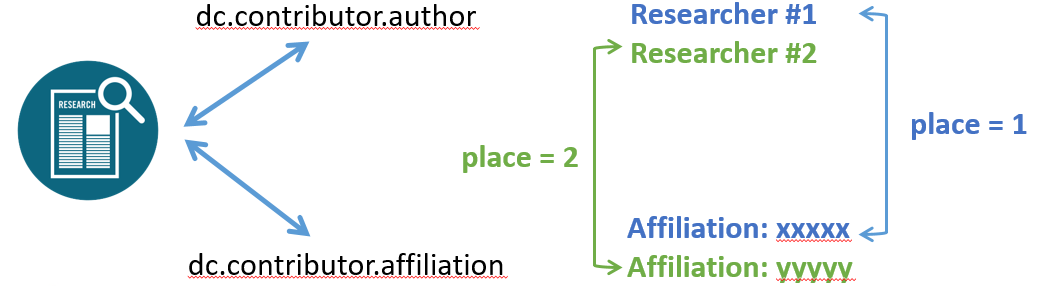
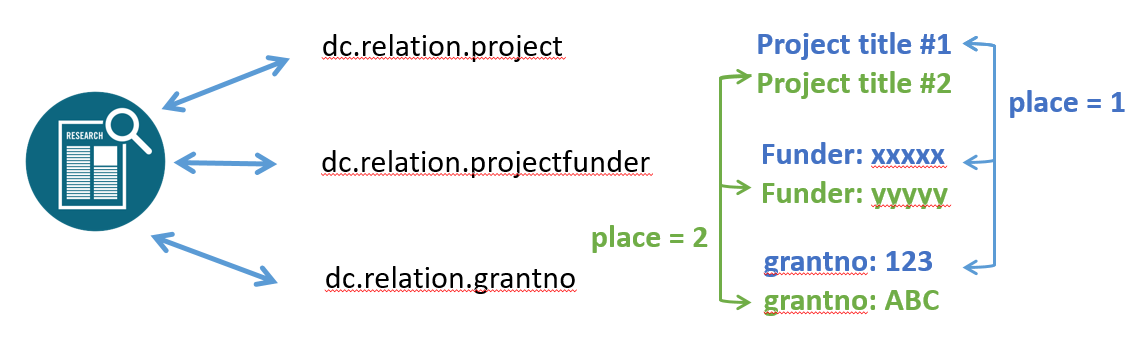
As discussed above, in some case it is needed to store nested information or additional information that are loosely related to a linked object. It is clear for instance that the author affiliation that appear on the paper is often the current affiliation of the researcher or at least one of his previous affiliation. In such case it is convenient for the user to have such information pre-filled when the researcher is selected so to only change it when needed.
To do that DSpace uses special extra information on the ChoiceAuthority, everything that is prefixed with data- will be copied over the corresponding metadata if present in the same page than the metadata authority controlled. For instance if the authority report an extra property named data-dc_contributor_department and in the page where the authority is enabled (ie typically where is included the dc.contributor.author) is presente a metadata dc.contributor.department (please note the different syntax used here _ and .) the extra property will be used to fill this metadata.
Out of box DSpace provides configurable implementations of the Authority that support exposure of metadata (and linked object metadata) as extra properties, they are
|
the extra properties to expose are configured in the cris-authority-metadatagenerator.xml
In the cris-authority-metadatagenerator.xml you will see
|
defines where the additional information will be saved, it uses the editmetadata.jsp syntax so _ instead than .
|
defines the property to use in the linked RP to fill the extra information, in such case the affiliation "nested"
|
defines the property inside the previous nested to use, so the organisation
|
finally, define which attribute of the linked orgunit use as display value
Sometimes, there are some important necessary derived informations that we want to see. All of these informations can be stored, like normal metadatas, inside new metadata items.
This functionality is provided by ItemEnhancers or MetadataEnhancers.
Inside DSpace we can define some enhancers to enrich items’ metadatas using the metadata-enahncers.xml file, located inside the spring configuration folder ({dspace-home}config/spring/api).
Here we define the service that reads and enhances / enriches metadatas, ItemEnhancerServiceImpl. Also here are defined all the enhancing rules (defined by declaring beans) that will be applied to the new or edited metadatas.
Each bean should define:
class: Defines the logic behind the mapping;
sourceEntityType: Item Type to enhance;
sourceItemMetadataField: Source field (should contains authority reference);
relatedItemMetadataField: Related field (field of the item retrievable using the source field);
virtualQualifier: Qualifier of the newly mapped metadata (value behind related field).
The mapping functionality depends on the implementation of the bean (class definition), and actually there are two main implementations:
RelatedEntityItemEnhancer;
HierarchicalRelatedEntityItemEnhancer.
The purpose of this enhancer is to extract target metadata from a linked entity to the entity itself. Here you should define the entity to enrich (sourceEntityType) and the metadata of the Item that contains a reference to the linked entity (sourceItemMetadataField), so once loaded the linked entity the target relatedItemMetadataField inside it will be mapped into a virtualQualifier metadata of the source item.
This process will be useful when you need to filter or assign some metadatas extractable from the linked entities, and only the necessary metadata will be stored (not the entire item).
As you can tell from its name, this implementation extracts metadatas from linked hierarchical entities.
Like the previous one, you should define the entity to enrich (sourceEntityType) the metadata that contains a reference to a Hierarchical entity (sourceItemMetadataField) and the metadata of the Hierarchy used to traverse it (relatedItemMetadataField).
The hierarchy will be traversed and mapped inside the source item using the vitrualQualifier field, until a void or null value is found.
In this case you will be able to reproduce all the Hierachy of the item, and this information could be very useful to visualize and / or filter for.
In the metadata-enhancer.xml provide a list of the entities that will be using the virtual-metadata:
|
In the metadata-enhancer.xml again, provide the bean for the virtual to be generated:
Reference the entity list:
|
And provide the list for the metadata to be used as source for the virtual:
|
Provide the related metadata:
|
and at last the name to be used for the virtual:
|
This will result in the virtual being named cris.virtual.translatedNames
|
Now, don't forget to provide virtual in the filter in the discovery.xml:
|
Last step, provide both the metadata in the registry both source and the virtual itself and import:
|
All content on the LYRASIS Wiki is licensed under the CC BY (Attribution) license , unless otherwise noted.