All Versions
DSpace Documentation
Contribute to the DSpace Development Fund
The newly established DSpace Development Fund supports the development of new features prioritized by DSpace Governance. For a list of planned features see the fund wiki page.
The LDN system, as a message exchanging i/o system, has an inbox and an outbox. Every LDN message refers to a Notify Service: all the Notify Services are configured manually from the admin application form. A Notify Service is just like an authority labelled on LDN messages.
The Quality Assurance system is the implementation of item metadata updates operations. A Quality Assurance Event contains informations for item metadata updates: QAEvent are stored into QAEvent solr collection. All of the QAEvent are shown on an administration form. Every QAEvent can be accepted, ignored or removed: if accepted some metadata of the referred item are modified, if ignored or removed nothing about the item is modified. Every QAEvent has a property named source : qa events created by processing an LDNMessage has source="coar-notify".
To process an LDN message means to create a QAEvents; as soon as the QAEvent is accepted the referred item is updated. We do it by routing LDN Messages from the queue to the LDN Router. The LDN Router is designed into the spring file /dspace/config/spring/api/ldn-coar-notify.xml on the bean ldnRouter. The router de-multiplex two attributes read from the LDN Message (two string values inside the array called type) content to java classes called Processors: see org.dspace.app.ldn.processor.* package to view them all.
The match between LDN message type and the QAEvent topic (suddenly created by the evaluation of the ldn message from the queue) is configured onto ldn-coar-notify.xml spring file. Every Processor owns a list of actions. An action is often an email to be sent and an action to create the qa event. The LDN processor receives the QAEvent topic as a parameter and creates the relative QAEvent.
Third party system can retrieve the location of the repository LDN InBox via the LDN autodiscovery mechanism, nevertheless to be able to interact with DSpace they need to be approved by a Repository Administrators and listed in the LDN Services Directory (see next paragraph); otherwise their messages will be flagged as untrusted and not processed at all.
You need to register the external services to allow the handling of the incoming LDN messages.
These services are also used to send LDN notification during the submission process of an item (Please take a look at LDN Inbound pattern)
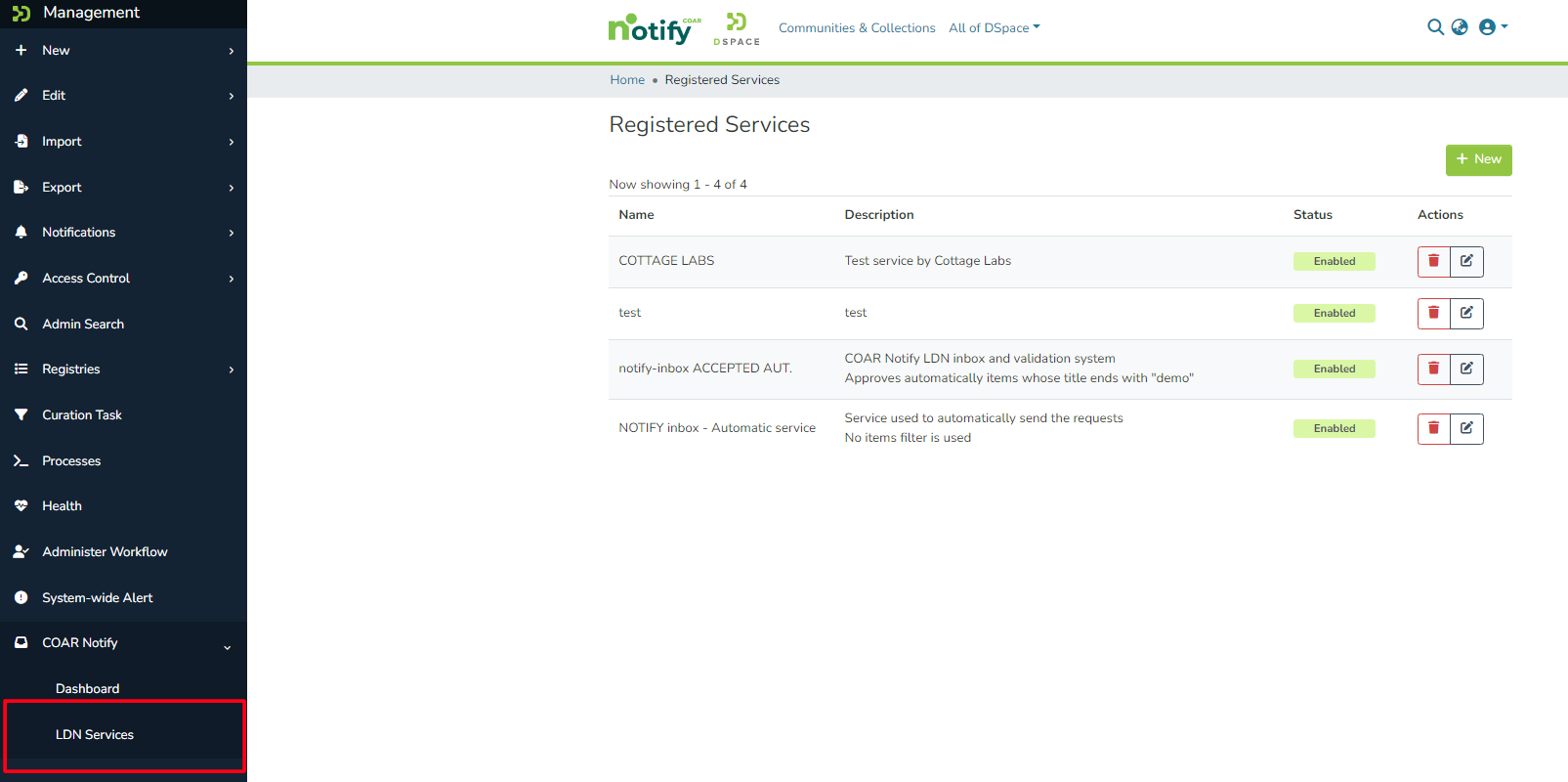
Administrators can manage services using the menu LDN Services.
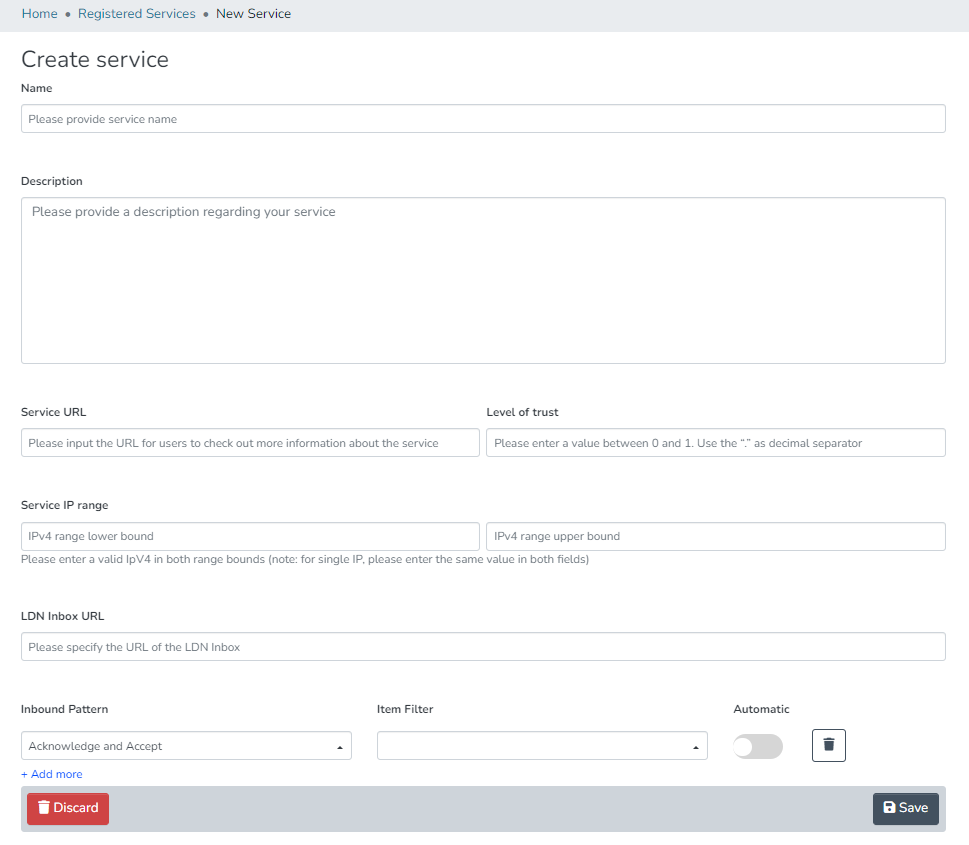
The following page is used to submit a new LDN Service:
|
| Name: a label for the Notify Service used on the UI |
| Description: the description of the Notify Service - add details here |
Service URL: the url of the remote Notify Service. This is mostly used as a descriptive URL when sending notification to an external system. The service URL must not be confused with the inbox url. As said this url is descriptive so we expect the main application URL to be added here |
Level of Trust: floating point number value accepted between 0 and 1. This value is used to assign to the service a TRUST value that describes how much reliable the external service is. This value is not used if the automatic processing of QA Events is disabled Check the configuration file dspace/config/spring/api/qaevents.xml to enable the automatic approval When the automatic approval is configured the trust value of the LDN Service is check against configured score thresholds. Thresholds for automatic Approval/Rejection/Ignoring can be set. Also within a specified range QA Events will need a manual approval |
Service IP Range: two IP addresses expected as minimum and maximum. This range is used to validate the received LDN Messages. When the LDN notification doesn't match the configured IP Range the notification is stored as UNTRUSTED |
LDN Inbox URL: this is the url used to send the LDN Notifications. This url is also used when a notification is received to retrieve the registered LDN service it belongs to This URL must is unique among the registered LDN Services |
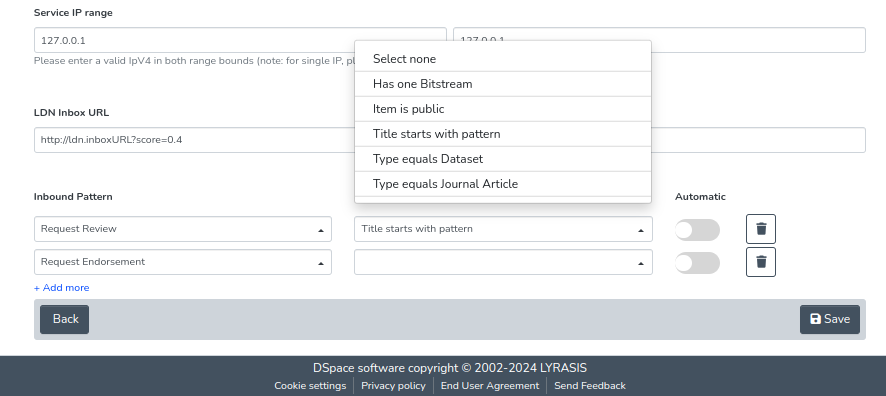
Inbound Pattern: the section for Inbound pattern is the section which describes what operations/actions are supported by the external service The pattern itself can be selected from the dropdown as there's a list of pattern. To better understand pattern usage please The item filter is used to describe which item can be processed for the current LDN Service/Inbound pattern. The automatic flag when set to true the ldn message exchange is performed automatically right after the item submission has finished. |
LDN incoming messages are stored into the ldn_message database table. As far as the property ldn.enabled is true and the incoming json is valid, the LDN Message is stored on the table. Together with the storage of the record, the queue status of the message is initialized. The queue_status column of the table contains the status of the LDN message inside the queue. All the possible queue_status values are described into the java class org.dspace.app.ldn.LDNMessageEntity as integer constants.
Status name | Value in DB | Description |
QUEUE_STATUS_UNTRUSTED_IP QUEUE_STATUS_UNTRUSTED | 0 5 | Message must not be routed as it is not trusted. This may occur if the IP address of the notifications' sender doesn't match the provided "IP Range" or if the service inbox URL in the origin section of the message doesn't match with any registered LDN Service entry's Inbox URL. |
| QUEUE_STATUS_QUEUED | 1 | Message is waiting in the queue to be processed by the Extractor |
| QUEUE_STATUS_PROCESSING | 2 | Message is currently being processed by the Extractor |
| QUEUE_STATUS_PROCESSED | 3 | Message has been successfully processed by the Extractor |
| QUEUE_STATUS_FAILED | 4 | Message has been evaluated but its routing has failed |
If all validations are run successfully the LDN Notification status is set as QUEUE_STATUS_QUEUED and the notification will be processed as soon as the extractor retrieves it from the queue.
The LDN Message logical queue is managed by:
Please consider that this means that the corresponding QAEvent is not automatically created as soon as the LDN Message is received.
The QA Event related to the LDN Notification will be created only once the notification is successfully processed by the extractor (LDN queue status set to QUEUE_STATUS_PROCESSED).
Considering these possible scenarios here at: COAR Notify Protocol: Example Scenarios
We have to keep the user updated about the item situation. We do it with colored boxes on its landing (handle) page.
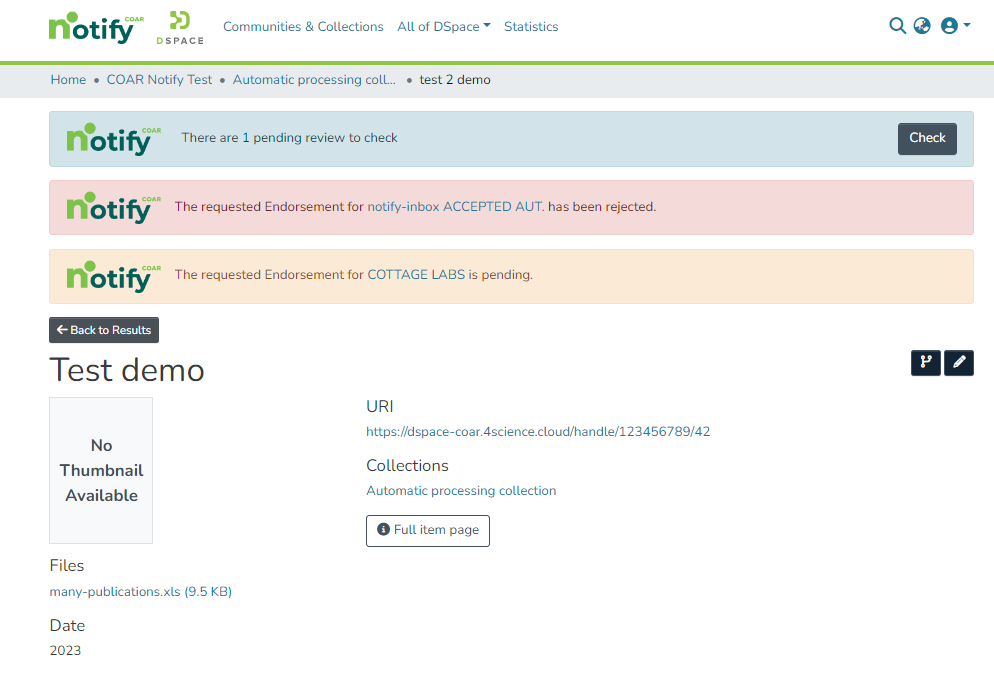
When the Offer message (being it review, endorsement or ingest) has been sent as an outgoing LDN message, and nothing else about it has been received, the yellow box is shown.
When the Offer message has been followed by a related incoming Acknowledgement message: if the ack is a tentative rejct the box shown is red.
When Offer message has been followed by a related Announce incoming message, the box shown is blue! It is blue because receiving an Announce means - then the message is extracted - we produce a new QA Event. As every QA Event it is shown on Item Page and myDSpace page.
Score is a number 0 < # < 1.
If the proper configuration is enabled an automatic check for approval of QAEvents is run once the LDN message is extracted.
On qaevents.xml file the bean qaScoreEvaluation we can configure three different boundaries to automatically approve/reject/ignore the level of trust:
<property name="scoreToReject" value="0.3" /><property name="scoreToIgnore" value="0.5" /><property name="scoreToApprove" value="0.8" />
scoreToIgnore < score < scoreToApproveThis feature must not be confused with the automatic triggering for LDN Inbound pattern
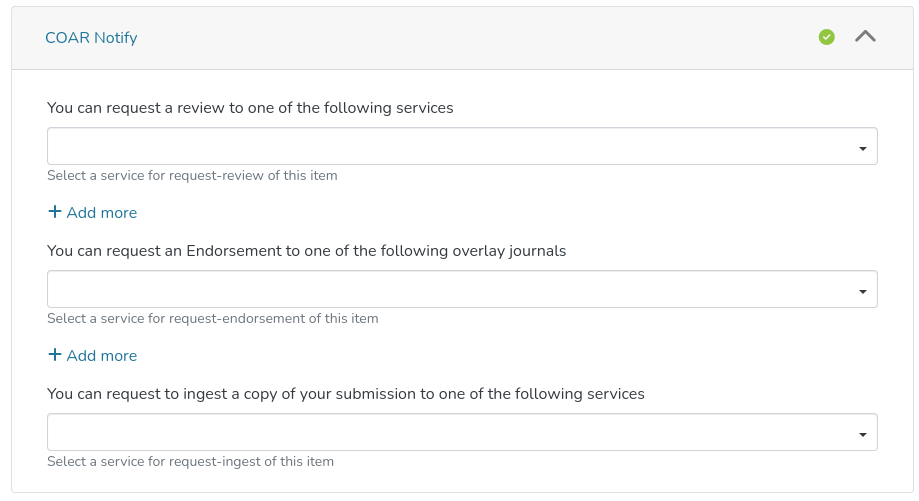
In the example below it is shown the submission of an Item with a new section for COAR-Notify.
In this section we can manually choose ldn-services (which were not marked as automatic) in order to ask for Review, Endorsement and Ingest to external services.
If No (non-automatic) pattern has been configured for the LDN Service this service will not be displayed in any of the dropdown.
|
When adding new LDN Inbound pattern to a LDN Service we can select if a pattern has to be automatic or not.
Flagging a pattern as automatic means that the request described by the current pattern is sent automatically to the external service:
When adding inbound pattern to a service we have the possibility to add an item-filter for each described pattern
An item filter allows to filter items according to specified criteria.
Item Filter is a non-mandatory field. It activates a filter to be applied to the item during the submission.
If the item matches the item filter condition the submission will be successful: otherwise the submission will fail with a talkative message.
Visible item filters are configured into a static list mapped into item-filters.xml file - on a bean named ldnItemFilters. We established for the following item filter to be shown:
Has one Bitstream = the item must have exactly one bundle named "ORIGINAL";
Item is public = anonymous user can see/read the item;
Title starts with pattern = the dc.title metadata of the item must start with 'Pattern';
Type equals dataset = the dc.type metadata of the item must be 'Dataset';
Type equals dataset = the dc.type metadata of the item must be 'Journal Article';
item-filter.xml has all item filters declarations: only the ones declared inside the ldnItemFilters map are shown.
The LDN Consumer is the consume responsible for generating the outgoing LDN Notification.
This consumer is triggered any time an Item is successfully installed and a check against the registered LDN Services/patterns is done to generate the appropriate LDN Notification
This consumer is responsible for the handling of both automatic a non-automatic patterns
| event.consumer.ldnmessage.class = org.dspace.app.ldn.LDNMessageConsumer event.consumer.ldnmessage.filters = Item+Install |
|---|
The LDN Notification includes some important section many of these if improperly set might led to errors in evaluations on the notification
Let's take a deeper look at the LDN Notification structure
The context section is the same for any LDN Notification
|
|---|
This section describes the actor which performs the request
This is a descriptive section and doesn't include important information
|
|---|
This is one of the most important section.
In this section we have a description of the Item being involved in the LDN Notification
other fields are descriptive fields for the item
|
|---|
The identifier of the LDN notification (Each notification has a different id)
| "id": "urn:uuid:94ecae35-dcfd-4182-8550-22c7164fe23f" |
|---|
This field is used to reply to other LDN notification so that the system knows if the current notification is a response
| "inReplyTo": "urn:uuid:0370c0fb-bb78-4a9b-87f5-bed307a509dd" |
|---|
This is a descriptive section of the received Review, Endorsement etc..
|
|---|
This is an important section since it is used (for incoming notifications) to determine the service among the registered ones.
If the service is not recognized as registered the notification is untrusted
The field being used for this check is inbox
|
|---|
This section is used to describe the target system involved in the notification workflow
|
|---|
This type section is important since it's determining how to process/evaluate any received notification
|
|---|
 DSpace 7 Tutorial.postman_collection.json
All content on the LYRASIS Wiki is licensed under the CC BY (Attribution) license , unless otherwise noted.