All Versions
DSpace Documentation
Unreleased Documentation
This documentation is unreleased and still in development. It may describe features which are not yet released in DSpace.
Looking for another version? See all documentation
The Authority Framework enables real-time entity lookup, confidence-based linking, and automatic graph maintenance through server-side consumers.
On the UI, it introduces a new way to link authority controlled metadata to the related item, generating a link in search results or item page, this connection is handled in submission.
When the relationship is managed internally, i.e between dspace items the uuid of the linked item is stored as authority value in the metadata holding the relationship from the source item. For instance, given a publication Item A the metadata dc.contributor.author will have the value “Mario Rossi” and the authority of such metadata value will be the UUID of a Person Item B that represents the person “Mario Rossi”.
In order to use the Authority Framework functionality the Virtual Metadata feature should be disabled with the following property:
relationship.enable-virtual-metadata = false
Be aware that currently there is no way to go back and forth from Virtual Metadata Relations to Authority Framework Relations.
Relationships are always implicitly bidirectional with one preferred side that will be used to actually store the data. The side holding the relationship is usually identified as the one that changes more frequently compared to the other or the one that usually is created later. For instance to store the “author” relationship between publication - person it is better to use metadata in the publication record so that when new publications are added to the system for an existing person only the new publication record is touched and there is no need to edit also the person record.
The primary class for retrieving authority choices from DSpace items is the ItemAuthority.
ItemAuthority are configured using the authority.cfg file; a configuration example is shown below:
plugin.named.org.dspace.content.authority.ChoiceAuthority = \
 org.dspace.content.authority.ItemAuthority = OrgUnitAuthority

choices.plugin.person.affiliation.name = OrgUnitAuthority
choices.presentation.person.affiliation.name = suggest
authority.controlled.person.affiliation.name = true

cris.ItemAuthority.OrgUnitAuthority.entityType = OrgUnit
From this configuration we can understand that the metadata person.affiliation.name is linked to an OrgUnitAuthority and to a Person type entity.

It provides Solr-based searching for authority records.
# Plugin Registration
choices.plugin.{metadata_field} = {authority_class}


# Presentation Style
choices.plugin.{metadata_field}.presentation = autocomplete|lookup|select


# Controlled Fields
authority.controlled.{metadata_field} = true|false

# Entity Type Mapping
cris.ItemAuthority.{metadata_field}.entityType = {entity_type}
cris.ItemAuthority.{metadata_field}.entityType = {EntityType}
Through a rest configuration, it is also possible to activate an "auto-fill" functionality, which will populate the submission fields based on the selected value (value must be authority controlled).
Example of config in cris-authority-metadatagenerator.xml:
<bean class="org.dspace.content.authority.ItemSimpleAuthorityMetadataGenerator">
    <property name="authorityName" value="AuthorAuthority"/>
    <property name="keyId" value="person_identifier_orcid"/>
    <property name="useForDisplay" value="true"/>
    <property name="useAsData" value="true"/>
    <property name="schema" value="person"/>
    <property name="element" value="identifier"/>
    <property name="qualifier" value="orcid"/>
    <property name="singleResultOnAggregate" value="true"/>
</bean>
authorityName : is the name of the authority that will provide the metadata enrichment
keyId: is the name of the metadata that will be exposed in the other-information property for the authority entry. If useAsData is set to true this metadata will be enriched in the submission form where the authority entry is used
useForDisplay : if this flag is set to true the value of the metadata set in the keyId is also displayed as additional information when the authority entry is shown as result in the submission form (if missing default value is true)
useAsData : if this flag is set to true the value of the metadata set in the keyId is used for the enrichment, so it’s required Metadata enrichment functionality (if missing default value is true)
schema : the schema of the metadata belonging to the authority entry which is exposed and used for the enrichment
element : the element of the metadata belonging to the authority entry which is exposed and used for the enrichment
qualifier : the qualifier of the metadata belonging to the authority entry which is exposed and used for the enrichment
singleResultOnAggregate : if set to true, the search results are squashed by placing the various values in the resulting string when they are different from each other. Otherwise, the different results are listed. It is used with true only with search queries that give unique and precise results (such as queries based on ORCID value).
Considering the previous configuration if the AuthorAuthority is used in a Publication entity, when an authority entry is selected the metadata oairecerif.author.affiliation present in the Publication is enriched with the value of the metadata person.affiliation.name present in the item which the authority entry refer to.
Note : Every metadata defined as source for the authority enrichment should be present even in the property discovery.index.projection of the discovery.cfg file, e.g. :
|
After changing the discovery.index.projection property a reindex is required.
Standard solr query that performs the lookup of items during ItemAuthority (org.dspace.content.authority.ItemAuthority) getMatches() method can be extended with custom query filters.
To facilitate this, standard abstract class org.dspace.content.authority.CustomAuthorityFilter is provided. To define custom filter, this class needs to be extended and instrumented as Spring Bean.
Extending classes must implement appliesTo() method, that checks if custom filter queries need to be applied, according to its own custom internal logic.
Two ready-to-be configured extensions are provided by classes org.dspace.content.authority.EntityTypeAuthorityFilter and org.dspace.content.authority.AuthorityNameAuthorityFilte that allow users to define some static queries which don't need to use particular runtime logic.
org.dspace.content.authority.EntityTypeAuthorityFilter provides a way to filter out the elements according to their Entity type. The supported entities need to be listed using the supportedEntities field, while the filtering parameters are specified with the customQueries field.
org.dspace.content.authority.AuthorityNameAuthorityFilter provides a way to filter out the elements according to their Authority name. The supported entities need to be listed using the supportedEntities field, while the filtering parameters are specified with the customQueries field.
customQueries , supportedAuthorities and supportedEntities fields can be set directly while configuring the Spring bean.
Following snippet is an example of filtering by Entity type:
	<bean class="org.dspace.content.authority.EntityTypeAuthorityFilter">
		<property name="supportedEntities">
			<util:list>
				<value>EntityOrg</value>
				<value>EntityPerson</value>
			</util:list>
		</property>
		<constructor-arg name="customQueries">
			<util:list>
				<value>dc.type:mytype</value>
			</util:list>
		</constructor-arg>
	</bean>
Following snippet is an example of filtering by Authority name:
	<bean class="org.dspace.content.authority.AuthorityNameAuthorityFilter">
		<property name="supportedAuthorities">
			<util:list>
				<value>EntityOrgAuthority</value>
				<value>EntityPersonAuthority</value>
			</util:list>
		</property>
		<constructor-arg name="customQueries">
			<util:list>
				<value>dc.type:mytype</value>
~/Projects/4science/dspace-cris/source-rest task/main-cris/DSC-2688* ≡
            </util:list>
		</constructor-arg>
	</bean>
In order to enable one of these custom filters, the corresponding Spring configuration xml needs to be put in any spring configuration file under the following path config/spring/api.
For metadata controlled by an authority related to Person item, it is possible to configure the org.dspace.content.authority.OrcidAuthority which allows, in addition to searching for matches between persons stored in DSpace-CRIS, also to search for profiles on the ORCID register. The OrcidAuthority is therefore a class that extends the org.dspace.content.authority.ItemAuthority and appends the profiles identified on the ORCID register to the results identified by the ItemAuthority.
To set which metadata should be associated with this authority it is necessary to modify the file authority.cfg, as for the other authorities. By default, all the authorities linked to entities of type Person are configured with the OrcidAuthority.
To identify the profiles on the ORCID register that match a specific string (the name of the person linked to the profile), the OrcidAuthority uses the expanded search endpoint made available by ORCID. For more information about the expanded search click here.
Given an input “XYZ”, the query sent to the search endpoint is the following:
given-names:XYZ+OR+family-name:XYZ+OR+other-names:XYZ
If the input name has spaces or commas then the query shown above is duplicated for each section of the name, concatenating them with AND. For example, a search for "Smith, John" produces the following query:
(given-names:Smith+OR+family-name:Smith+OR+other-names:Smith) AND (given-names:John+OR+family-name:John+OR+other-names:John)
The request that is made is paged on the basis of the pagination set and taking into account the number of results resulting from the research of the ItemAuthority.
If the ORCID API keys are configured then the search is performed on the API endpoint, first obtaining a read public access-token; if instead the API keys are not configured then the public endpoint is contacted.
For each profile identified by the search described above, a choice is constructed with the following attributes:
authority → the ORCID iD of the profile with the prefix configured through the xxx property.
Example: will be referenced::ORCID::0000-0000-0123-4567
label → the given and family name of the profile
value → the given and family name of the profile
extras → the ORCID iD (data-person_identifier_orcid) and, if present, the list of all the institutions linked to the profile (institution-affiliation-name).
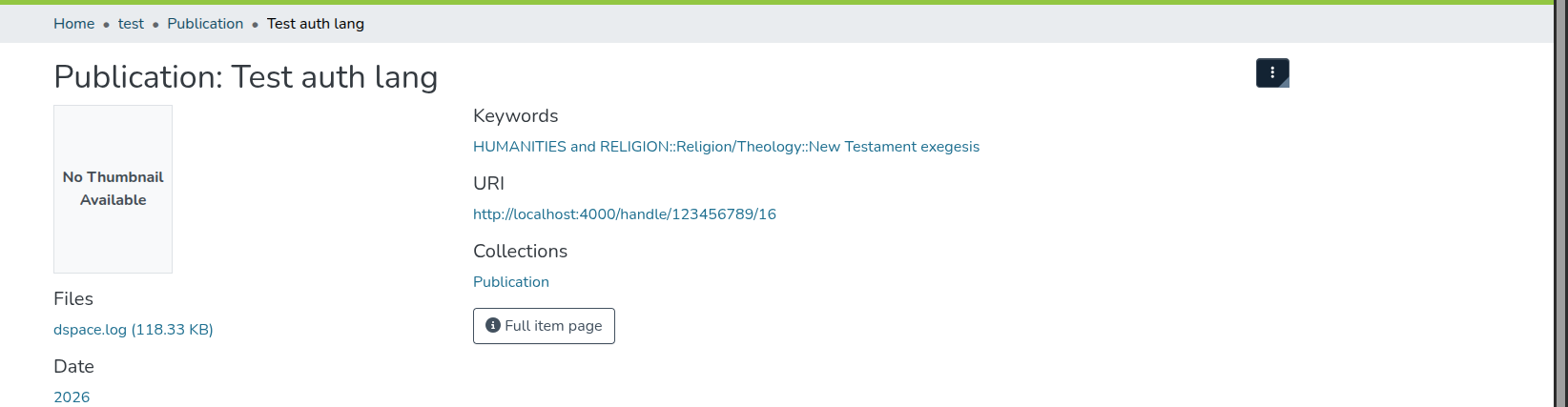
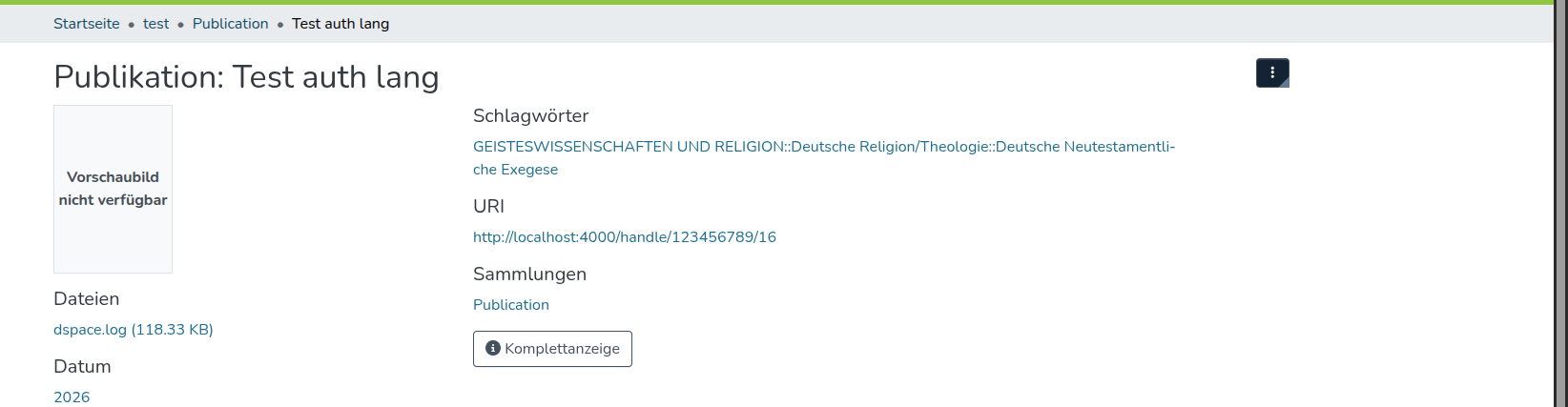
In addition, DSpace supports multilingualism for authority-controlled vocabularies. To achieve this, a vocabulary version for each language should be enabled by the property: webui.supported.locales
For instance if we have
webui.supported.locales = en, de
we can create a translated vocabulary (e.g. srsc_de.xml) and then configure the authority as follows (authority.cfg):
vocabulary.plugin.srsc.hierarchy.store = true
vocabulary.plugin.srsc.hierarchy.suggest = true
vocabulary.plugin.srsc.delimiter = "::"
vocabulary.plugin.authority.store = true
authority.controlled.dc.subject = true
This will enable to display the translated value in the UI, if the language matches the translated one:
EN:
DE:
All content on the LYRASIS Wiki is licensed under the CC BY (Attribution) license , unless otherwise noted.