All Versions
DSpace Documentation
Unreleased Documentation
This documentation is unreleased and still in development. It may describe features which are not yet released in DSpace.
Looking for another version? See all documentation
Enabling PDF Cover Pages may affect your site's visibility in Google Scholar (and similar search engines)
Google Scholar specifically warns against automatically generating PDF Cover Pages, as they can break the metadata extraction techniques used by their search engine. Be aware that enabling PDF Cover Pages may also cause those items to no longer be indexed by Google Scholar. For more information, please see the "Indexing Repositories: Pitfalls and Best Practices" talk from Anurag Acharya (co-creator of Google Scholar) presented at the Open Repositories 2015 conference.
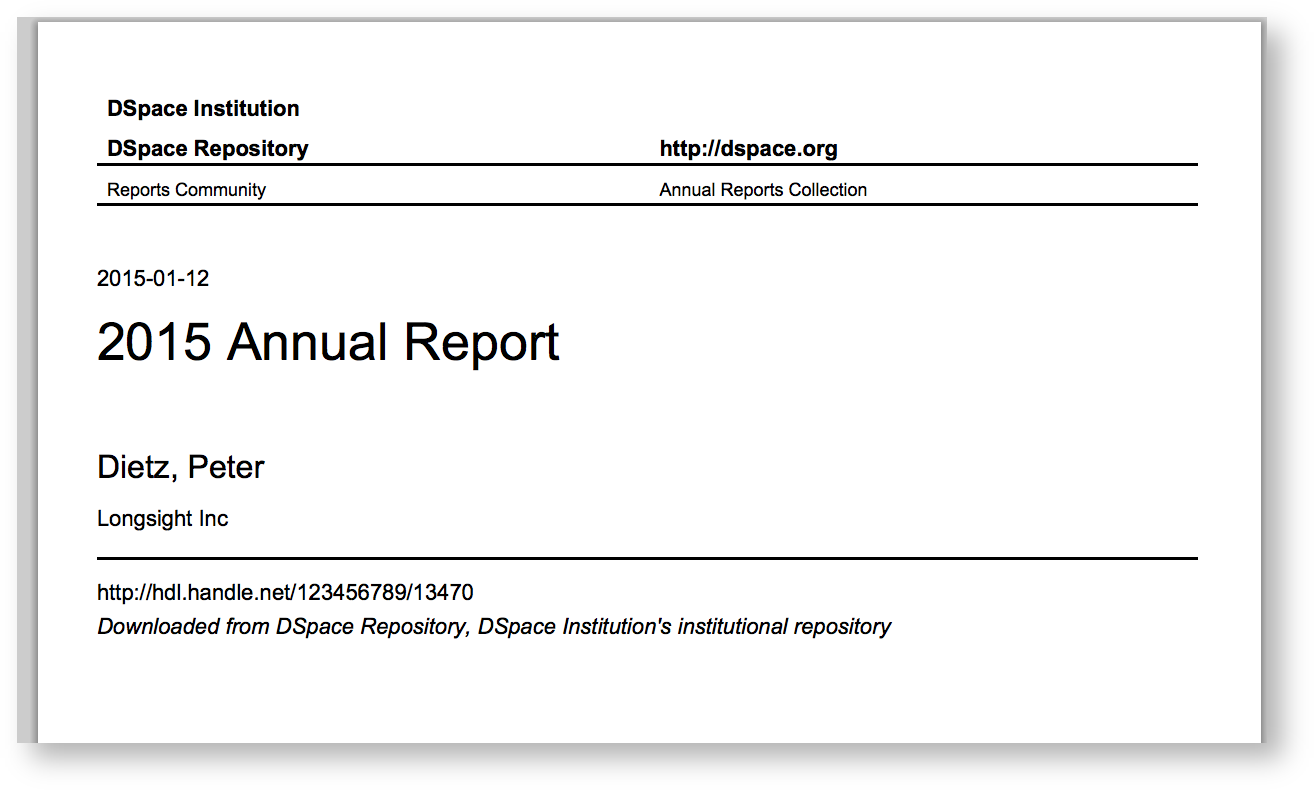
Adding a cover page to retrieved documents from DSpace that include additional citation information has been sought, as documents uploaded to the repository might have had their context stripped from them, when they are just a PDF. Context that might have surrounded the document would be the journal, publisher, edition, and more. Without that information, the document might just be a few pages of text, with no way to piece it together. Since repository policy might be to include this information as metadata to the Item, this metadata can be added to the citation cover page, so that the derivative PDF includes all of this information.
The citation cover page works by only storing the original PDF in DSpace, and then generating the citation-cover-page PDF on-the-fly. An alternative set up would be to run the PDF Citation Coverpage Curation Task on the DSpace repository contents, and then disseminate the pre-generated citation-version instead of generating it on the fly.
Configuration file renamed to citation-page.cfg and configurations names have changed
As of DSpace 6.0, the configuration file for this feature was renamed from disseminate-citation.cfg to citation-page.cfg. The renaming was to clarify the purpose of this configuration file, as its previous name was misleading / confusing to some users.
In addition, all configurations below have now been prefixed with "citation-page" (e.g. the enable_globally configuration has been renamed to citation-page.enable_globally)
As of DSpace 9.0, a Thymeleaf templating engine was implemented to give greater control over layout and fields/metadata used in cover pages. The header, fields, and footing configuration properties were removed from citation-page.cfg as this work is now done in dspace-src/src/main/resources/dspace_coverpage.html
In the {dspace.dir}/config/modules/citation-page.cfg file review the following fields to make sure they are uncommented:
Property: | citation-page.enable_globally |
|---|---|
Example Values: | citation-page.enable_globally = true |
Informational Note: | Boolean to determine is citation-functionality is enabled globally for entire site. This will enable the citation cover page generator for all PDFs. Default: disabled |
Property: | citation-page.enabled_collections |
Example Values: | citation-page.enabled_collections = 1811/123, 1811/234 |
Informational Note: | List of collection handles to enable the cover page generator for bitstreams within. Default: blank |
Property: | citation-page.enabled_communities |
Example Values: | citation-page.enabled_communities = 1811/222, 1811/333 |
Informational Note: | List of community handles to enable the cover page generator for bitstreams within. Default: blank |
Property: | citation-page.citation_as_first_page |
Example Values: | citation-page.citation_as_first_page = true |
Informational Note: | Should the citation page be the first page cover (true), or the last page (false). Default: true, (first page) |
Property: | citation-page.page_format |
Example Values: | citation-page.page_format = LETTER |
Informational Note: | A4 or LETTER or another valid CSS3 page size. See https://flyingsaucerproject.github.io/flyingsaucer/r8/guide/users-guide-R8.html#xil_34 Default: LETTER |
Property: | citation-page.cover-template |
Example Values: | citation-page.cover-template = dspace_coverpage |
Informational Note: | The name of the HTML Thymeleaf template to use when generating cover pages. The template name is converted to a Thymeleaf resource e.g. Default: dspace_coverpage |
As of DSpace 9.0, the cover page is generated with an HTML templating engine. This allows for more flexible header, content, and footer layout.
The template uses the Thymeleaf templating language.
The default cover page template is in dspace-src/main/src/resources/dspace_coverpage.html and can be overridden using configuration properties as above.
The header, body, and footer content from the default template can be seen below. The metadata availability comes from the CoverPageContributor implementations (e.g. DefaultCoverPageContributor )
Variables can be referenced with ${variable_name}
<div class="page">
    <div class="header">
        <img th:src="@{classpath:dspace_logo.png}" src="dspace_logo.png"/>

        <div>
            <a th:href="@{https://dspace.org/}" href="https://dspace.org">
                https://dspace.org/
            </a>
        </div>
    </div>

    <div class="body">
        <div class="metadata">
            <!-- The metadata fields from the current item can be referenced here in the format schema_field_qualifier -->
            <div class="title" th:text="${metadata_title}">Test title</div>

            <div class="author" th:text="${metadata_author}">Author 1; Author 2; Author 3</div>

            <div class="editor" th:text="${metadata_editor}">Editor 1; Editor 2; Editor 3</div>

            <div class="issued" th:text="${dc_date_issued}">2017</div>

            <div class="publisher" th:text="${dc_publisher}">Publisher Name</div>

            <div class="identifier">
                <a th:href="${dc_identifier_uri}" href="${dc_identifier_uri}" th:text="${dc_identifier_uri}">https://hdl.handle.net/123456789/12345</a>
            </div>

            <div class="citation" th:text="${dc_identifier_citation}">Author 1 (2017), Test title. Publisher Name. Retrieved from https://hdl.handle.net/123456789/12345</div>
        </div>
    </div>

    <div class="footer">
        Downloaded from a DSpace repository.

        <a th:href="@{https://dspace.org}" href="https://dspace.org">
            https://dspace.org/
        </a>
    </div>
All content on the LYRASIS Wiki is licensed under the CC BY (Attribution) license , unless otherwise noted.