All Versions
DSpace Documentation
Contribute to the DSpace Development Fund
The newly established DSpace Development Fund supports the development of new features prioritized by DSpace Governance. For a list of planned features see the fund wiki page.
Dspace 10 allows to set a custom user defined URL to refer at a given Entity (Person, Publication, etc.) replacing the standard one in use in the system.
This URL is set in a submission form panel, custom-url , that can be placed in different submission definitions, in order to define who and when is able to define this URL (Submitter during submission, an user allowed to edit the Entity, just the administrators when editing an Entity, etc.).
Custom URL is then used to refer to DSpace entity where it has been set. Custom URL can be changed, previously existing value(s) can be kept or deleted. When kept, previously defined URLs will continue to redirect to the Entity. In this case, if /custom-url is called, browser will redirect to whereas, if /custom-url is deleted each http(s) call toward this URL will result in a 404.
        <submission-process name="Person">
            <step id="collection"/>
            <step id="personStep"/>
            <step id="custom-url"/>
            <step id="upload"/>
            <step id="license"/>
        </submission-process>
During the submission workflow, a dedicated submission step allows the user to choose or edit the Custom URL.

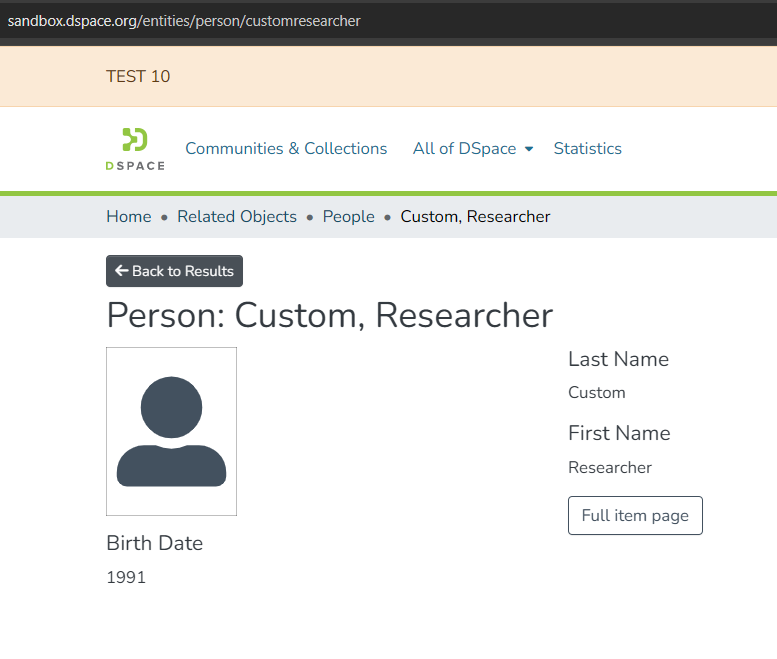
Once published, the Person item page is accessible using a URL that includes the custom segment.
Warning - Duplicate custom URLs
Custom URLs must be globally unique.
Assigning the same dspace.customurl value to more than one entity will cause all affected items to become inaccessible in the User Interface and display an “Error fetching item” message.
The Administer → Metadata screen does not prevent duplicate values.
Manual edits to dspace.customurl should be avoided unless strictly necessary and must always ensure uniqueness.
In case of duplication, the issue can only be resolved by an Administrator by accessing the item edit page directly
It is possible to define, for one or many entities, an auto-generation of the custom url, created starting from configurable metadata of the chosen Entity.
The following property defines which entity types are eligible for automatic custom URL generation:
dspace.custom-url.consumer.supported-entities = EntityType1,EntityType2
Only items whose entity type label exactly matches one of the values listed in this property will be processed by the CustomUrlConsumer.
For each entity type listed indspace.custom-url.consumer.supported-entities, a corresponding metadata mapping must be defined.
This mapping specifies which metadata fields are used to generate the custom URL.
The CustomUrlConsumer concatenates the values of the configured metadata fields in the order listed.
dspace.custom-url.consumer.entity-metadata-mapping.{EntityType} = field1,field2,...,fieldN
schema.elementdc.titleschema.element.qualifierdc.contributor.authorsupported-entities but no metadata mapping is defined for it, no custom URL will be generated for that entitySingle metadata field:
dspace.custom-url.consumer.entity-metadata-mapping.Publication = dc.titleMultiple metadata fields (concatenated):
dspace.custom-url.consumer.entity-metadata-mapping.Publication = dc.title,dc.contributor.author
Person entity using structured metadata:
dspace.custom-url.consumer.entity-metadata-mapping.Person = person.familyName,person.givenName
dspace.custom-url.consumer.supported-entities = Person, Publication, OrgUnit
dspace.custom-url.consumer.entity-metadata-mapping.Person = person.familyName,person.givenName
dspace.custom-url.consumer.entity-metadata-mapping.Publication = dc.title
dspace.custom-url.consumer.entity-metadata-mapping.OrgUnit = dc.title
The CustomUrlConsumer is registered as an event consumer and reacts to item lifecycle events:
event.consumer.customurl.class = org.dspace.app.customurl.consumer.CustomUrlConsumer
event.consumer.customurl.filters = Item+Install|Modify|Modify_Metadata
This means custom URLs are generated or updated when:
Warning - Duplicate custom URLs
When an item is versioned in DSpace, the custom URL behaves as follows:
All content on the LYRASIS Wiki is licensed under the CC BY (Attribution) license , unless otherwise noted.
2 Comments
Tim Donohue
Apr 09, 2026Grazia Quercia : It looks like you removed all the images from this page? Was that intentional? Could we maybe get updated images added to this page which represent the behavior in DSpace 10?
Grazia Quercia
Apr 13, 2026Done, thanks for the suggestion. What do you think? Does it need additional information? Thank you!