In some cases, you need to store groups of related information, such as the author and their affiliation as they appear in the publication “header”, the project title, grant number, funding program related to the publication, or the journal title, ISSN, E‑ISSN, etc.
In the first two examples, the group of metadata is repeatable. This means that the first value in the “author names” must be associated with the first value in the “affiliations”, and so on.
Generally, in DSpace, such scenarios are handled by using additional entities linked to the item. This is, of course, the proper way to manage this use case, but supporting additional entities in the system is not always an option or feasible in all contexts. In addition, you may want to allow the submitter to enter rich, structured information during item submission, to be stored or later consolidated into a separate entity.
In other cases, even when the information refers to external entities—such as in the example of author affiliations—this information also needs to be stored or “frozen” at the item level. For instance, you may be interested in knowing which institutions are listed as affiliations in a publication, regardless of the institutions currently linked to each author. Even assuming that you can precisely track an author’s affiliations over time (a complete career history), it would still not be possible to determine with certainty which institution the author chose to list in the publication signature. This is because the relevant date may be partially uncertain, and because the author may have selected one institution over another based on which actually supported the work described in the publication.
To meet these requirements, DSpace allows you to create groups of nested metadata in both the submission form and the item page.
The default group in the submission form is rendered as a nested form and is opened in a modal dialog, in order to isolate the form and define relationships between groups of metadata.
To use nested metadata groups, update your submission-forms.xml and item-submission.xml:
<step-definition id="publicationStepGroup" mandatory="true">
    <heading>submit.progressbar.describe.stepone</heading>
    <processing-class>org.dspace.app.rest.submit.step.DescribeStep</processing-class>
    <type>submission-form</type>
</step-definition>
Then reference it in a submission process:
<submission-process name="publication-submission">
    <step id="collection"/>
    <step id="publicationStepGroup"/>
</submission-process>
For group input type (used with relation-field), create a main form and child forms following the naming convention formName-dc-element-qualifier:
Main form (publicationStepGroup):
<form name="publicationStepGroup">
    <row>
        <relation-field>
            <relationship-type>isAuthorOfPublication</relationship-type>
            <search-configuration>person</search-configuration>
            <repeatable>true</repeatable>
            <label>Author</label>
            <hint>Enter the author's name.</hint>
            <linked-metadata-field>
                <dc-schema>dc</dc-schema>
                <dc-element>contributor</dc-element>
                <dc-qualifier>author</dc-qualifier>
                <input-type>group</input-type>
            </linked-metadata-field>
            <externalsources>orcid</externalsources>
        </relation-field>
    </row>
</form>
publicationStepGroup-dc-contributor-author):<form name="publicationStepGroup-dc-contributor-author"> <row> <field> <dc-schema>dc</dc-schema> <dc-element>contributor</dc-element> <dc-qualifier>author</dc-qualifier> <label>Author</label> <input-type>onebox</input-type> <repeatable>false</repeatable> <required>You must enter at least the author.</required> <hint>Enter the names of the authors.</hint> </field> </row> <row> <field> <dc-schema>oairecerif</dc-schema> <dc-element>author</dc-element> <dc-qualifier>affiliation</dc-qualifier> <label>Affiliation</label> <input-type>onebox</input-type> <repeatable>false</repeatable> <required /> <hint>Enter the affiliation of the author.</hint> </field> </row> </form>
For inline-group input type (simple field grouping):
<form name="publicationStepGroup">
    <row>
        <field>
            <dc-schema>dc</dc-schema>
            <dc-element>contributor</dc-element>
            <dc-qualifier>editor</dc-qualifier>
            <repeatable>false</repeatable>
            <label>Editor</label>
            <input-type>inline-group</input-type>
            <hint>The editors of this publication.</hint>
            <required>You must enter at least the author.</required>
        </field>
    </row>
</form>
Note: Child forms must be named using the pattern: {parentFormName}-{dc-element}-{dc-qualifier} for the group input type to resolve correctly.

A new group type called inline-group has been added to mantain the groups inside the main form and not in a modal, follows and example of config:
Please note that the inline-group as a limitation: all the fields needs to be configured inside one tag.
If you want to achieve a display on multiple rows, it can be don through styling, adding for example to each field the style tag as follows: <style>col-12</style>
This is a known limitation and should be added to the documentation as such.
 <row>
              <field>
                <dc-schema>dc</dc-schema>
                <dc-element>contributor</dc-element>
                <dc-qualifier>editor</dc-qualifier>
                <label>Editor group</label>
                <input-type>inline-group</input-type>
                <repeatable>true</repeatable>
                <required />
                <hint>Add the editor of this publication</hint>
              </field>
</row>

<form name="publicationStep-dc-contributor-editor">
          <row>
            <field>
              <dc-schema>dc</dc-schema>
              <dc-element>contributor</dc-element>
              <dc-qualifier>editor</dc-qualifier>
              <label>Editor</label>
              <input-type>onebox</input-type>
              <repeatable>false</repeatable>
              <required>You must enter at least the author.</required>
              <hint>The editors of this publication.</hint>
            </field>
            <field>
              <dc-schema>oairecerif</dc-schema>
              <dc-element>editor</dc-element>
              <dc-qualifier>affiliation</dc-qualifier>
              <label>Affiliation</label>
              <input-type>onebox</input-type>
              <repeatable>false</repeatable>
              <required />
              <hint>Enter the affiliation of the editor as stated on the publication.</hint>
            </field>
          </row>
</form>
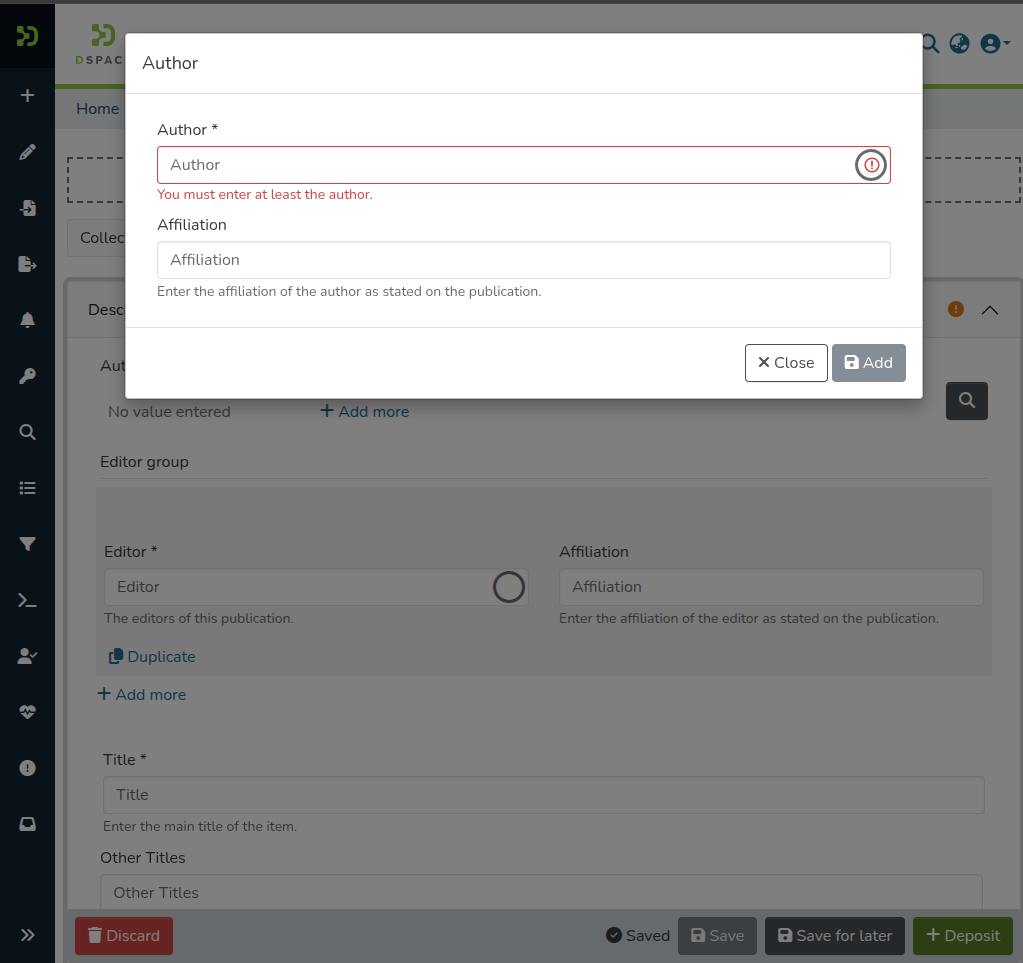
Please note that is not possible to add repeatable fields inside the nested forms, this would result in errors in the UI breaking the form. This is a known limitation and should be added to the documentation as such.
Input type specific configuration, as the regex, should be added inside the nested form configuration, as they don't work on input types which represent nested forms. (not an actual control in the form).
Note: For inline groups is possible to configure an additional button with the property showInlineGroupDuplicateButton , which if true, will display under the form a button to duplicate the whole section, metadata values included.