Available in 7.5 or later. |
Contextual help tooltips are a feature to provide additional information about how to use DSpace to less experienced users without cluttering the interface for more advanced users who do not need additional instruction.
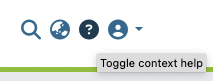
If the user visits a page where contextual help tooltips are available, a "toggle context help" button appears in the header, in between the language switch menu and user profile menu. Clicking this button toggles the visibility of the tooltips on the page (by default, they are invisible).
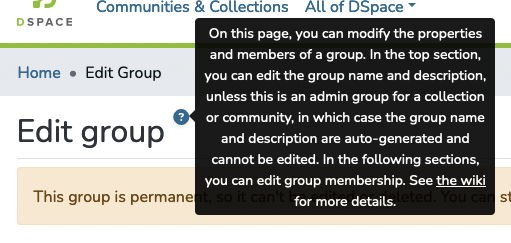
When tooltip visibility is turned on, similar looking buttons appear on the page where ever a tooltip is available.
Clicking any of these buttons makes a text bubble appear containing the contextual help; clicking anywhere outside of the bubble makes it disappear again.
Any HTML element can be given a tooltip by setting the *dsContextHelp attribute.
The value assigned to the attribute should be an object of type ContextHelpDirectiveInput:
export interface ContextHelpDirectiveInput {
  content: string;
  id: string;
  tooltipPlacement?: PlacementArray;
  iconPlacement?: PlacementDir;
} |
Placements; see the This is what the template looks like for the "Edit group" example in the "User Perspective" picture above:
<h2 class="border-bottom pb-2">
          <span
            *dsContextHelp="{
              content: 'admin.access-control.groups.form.tooltip.editGroupPage',
              id: 'edit-group-page',
              iconPlacement: 'right',
              tooltipPlacement: ['right', 'bottom']
            }"
          >
            {{messagePrefix + '.head.edit' | translate}}
          </span>
</h2> |
A few important notes:
*dsContextHelp` directly on the `h2` element makes the help button appear all the way on the right of the page, instead of directly to the right of the "Edit group" text.The 'content' field maps to the i18n key which is used to display the help text. This i18n key's value may include markdown-style links (only). At this time, other formatting is not supported. To display a link, use the following markdown syntax in your i18n value:
"admin.access-control.groups.form.tooltip.editGroupPage": "This is the text that would be displayed in the tooltip. And here is a link to the [DSpace 7 documentation](https://wiki.lyrasis.org/display/DSDOC7x/)." |