This feature, when enabled, offers a powerful additional layer of protection against possible unwanted behaviors like massive registrations performed by bots using random or stolen email addresses. Feature can be enabled or disabled by decision of DSpace instance administrator, and is based on Google reCAPTCHA.
ReCAPTCHA supported versions are v2 with both invisible (https://developers.google.com/recaptcha/docs/invisible) and checkbox (https://developers.google.com/recaptcha/docs/display) verification modes, and v3 (https://developers.google.com/recaptcha/docs/v3).
Before enabling the feature, a valid site and secret pair should be obtained from Google reCAPTCHA system, by registering the DSpace application on which verification will be set on reCAPTCHA admin panel (https://www.google.com/recaptcha/admin)
Once Google reCAPTCHA site and secret are registered and available, the following properties set in dspace.cfg or local.cfg will enable the CAPTCHA verification
registration.verification.enabled = true |
If version v2 of Google reCAPTCHA is to be enabled, these properties must be set in configuration:
google.recaptcha.version = v2 google.recaptcha.mode = <invisible or checkbox depending on which mode is wanted> google.recaptcha.key.site = <your site here> google.recaptcha.key.secret = <your secret here> |
If version v3 of Google reCAPTCHA is to be enabled, instead the following properties must be set in configuration:
google.recaptcha.version = v3 google.recaptcha.key.site = <your site here> google.recaptcha.key.secret = <your secret here> google.recaptcha.site-verify = https://www.google.com/recaptcha/api/siteverify google.recaptcha.key.threshold = <score threshold> google.recaptcha.mode = invisible |
The google.recaptcha.key.threshold property defines a threshold at which an interaction is considered "not a bot". reCAPTCHA v3 returns a score (1.0 is very likely a good interaction, 0.0 is very likely a bot). By default a good threshold could be 0.5. For further information, see https://developers.google.com/recaptcha/docs/v3#interpreting_the_score
Once this feature is enabled, the user registration will actually be performed if and only if the CAPTCHA token, passed in registration payload, is verified during registration process itself and is considered valid. Each registration request, even if made using DSpace REST APIs must have a captcha token in its header.
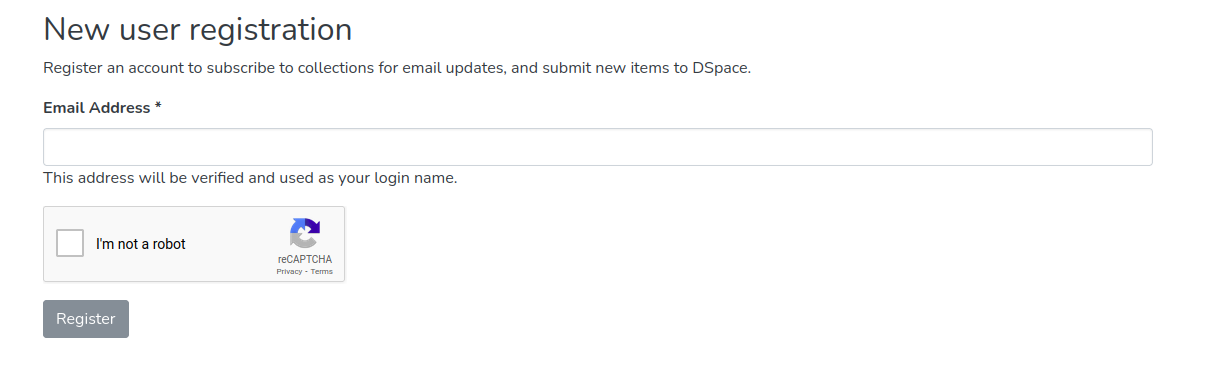
A new type of cookie has been added to DSpace cookie set, "Registration and Password Recovery". This cookie is proposed only when CAPTCHA verification is enabled.
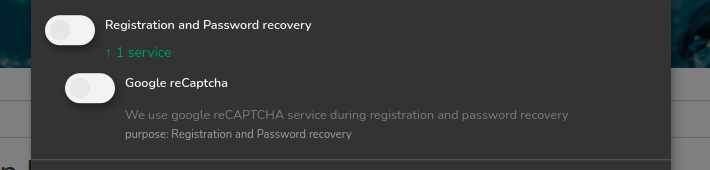
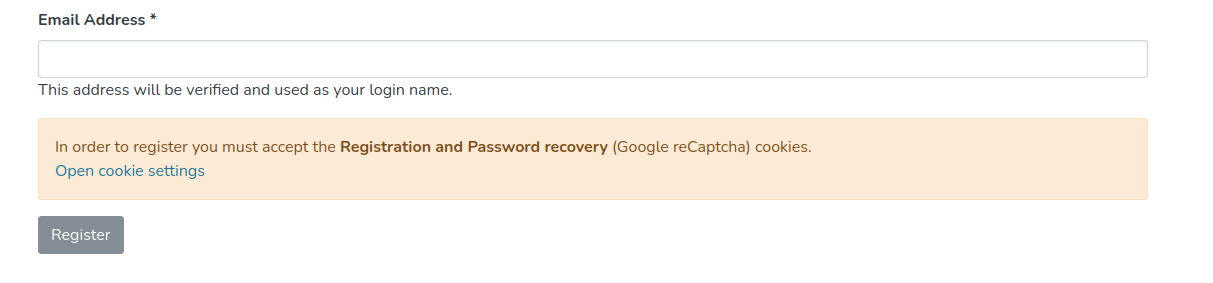
This cookie option must be enabled by users before registering, otherwise they won't be able to perform a registration
This feature is avaialble starting from DSpace 9.0 |
This feature allows the request-a-copy page to be protected by ALTCHA, a GDPR-compliant "Proof of Work" captcha framework, as an alternative to Google reCAPTCHA.
There is no need to register any access keys, and no cookies are used.
Set a secret HMAC key in local.cfg or modules/altcha.cfg - this altcha.hmac.key property will be used in the computation challenge sent to the browser. It can be any kind of string, like a passphrase.
# HMAC key. This is a *secret* key that should be unique to this server # Recommended use: ovewrite/set the value in local.cfg or environment variable to avoid accidental disclosure #altcha.hmac.key = YOUR_SECRET_HMAC_KEY |
How to protect request-a-copy form
To protect the request-a-copy form, set request.item.create.captcha to true in local.cfg or modules/requestitem.cfg
# Require a captcha for item request creation # Default: false request.item.create.captcha=true |