
In DSpace 7.0, the Biblio-Transformation-Engine (BTE) was removed in favor of Live Import from external sources. All online services and bibliographic formats previously supported by BTE have been moved or are being moved to the External Sources framework. |
Introduction
This documentation explains the features and the usage of the importer framework. The importer framework is built into both the REST API and User Interface. Currently supported formats include:
- Drag & drop of Endnote, BibTex, RIS, TSV, CSV, arXiv, PubMed. From the MyDSpace page, dragging & dropping one of these files will start a new submission, extracting the metadata from the file.
- Import via ORCID, PubMed, Sherpa Journals, Sherpa Publishers. From the MyDSpace page, you can select to start a new submission by searching an external source.
Supported External Sources
DSpace supports importing metadata from a variety of online services. Some of these services can ONLY support out-of-the-box Configurable Entities.
Supported online services are all configured on the backend in the [dspace]/config/spring/api/external-services.xml file. To disable a service, simply comment it out in that file.
Online providers available out of the box include:
- NASA Astrophysics Data System (ADS) lookup (Supported for creating new Items, or "Publication" Entities). Can be configured via "ads.*" settings in external-providers.cfg. REQUIRES an API key to function, signup at https://ui.adsabs.harvard.edu/help/api/
- arXiv lookup (Supported for creating new Items, or "Publication" Entities).
- CiNii lookup (Supported for creating new Items, or "Publication" Entities). Can be configured via "cinii.*" settings in external-providers.cfg. REQUIRES an API key to function, signup at https://support.nii.ac.jp/en/cinii/api/developer
- CrossRef lookup (Supported for creating new Items, or "Publication" Entities). Can be configured via "crossref.*" settings in external-providers.cfg
- European Patent Office (EPO) lookup (Supported for creating new Items, or "Publication" Entities). Can be configured via "epo.*" settings in external-providers.cfg. REQUIRES an API key to function, signup at https://developers.epo.org/
- OpenAlex lookup (Supported for creating new Items or Publication Entities). See also Live Import from external sources#OpenAlexIntegration
- ORCID
- ORCID author lookup (Only supported for creating new "Person" Entities). Can be configured via "orcid.*" settings in orcid.cfg.
- ORCID publication lookup (Supported for creating new Items, or "Publication" Entities). Allows you to lookup a publication based on an author's ORCID. Can be configured via "orcid.*" settings in orcid.cfg.
- PubMed
- Search PubMed (Supported for creating new Items, or "Publication" Entities). Can be configured via "pubmed.*" settings in external-providers.cfg
- Search PubMed Europe (Supported for creating new Items, or "Publication" Entities). Can be configured via "pubmedeurope.*" settings in external-providers.cfg
- ROR lookup (Supported for creating new "Organization" Entites). It's enabled via "
ror.*" properties inside the "external-providers.cfg". Other specific configuration for the "data-provider" and the medatada mapping can be found respectively inside "external-services.xml" and " ror-integration.xml" files. The API is publicly available, for some other implementation details you can refer to these PRs: - SciELO lookup (Supported for creating new Items, or "Publication" Entities). Can be configured via "scielo.*" settings in external-providers.cfg.
- Scopus lookup (Supported for creating new Items, or "Publication" Entities). Can be configured via "scopus.*" settings in external-providers.cfg. REQUIRES an API key to function, signup at https://dev.elsevier.com
- Sherpa Romeo
- Sherpa Journals by ISSN (Only supported for creating new "Journal" Entities)
- Sherpa Journals (Only supported for creating new "Journal" Entities) - supports looking up a Journal by title
- Sherpa Publishers (Only supported for creating new "OrgUnit" Entities)
- VuFind lookup (Supported for creating new Items, or "Publication" Entities). Can be configured via "vufind.*" settings in external-providers.cfg
- Web of Science lookup (Supported for creating new Items, or "Publication" Entities). Can be configured via "wos.*" settings in external-providers.cfg. REQUIRES a paid API key to function, signup at https://developer.clarivate.com/apis/wos
Disabling an External source
By default, DSpace has all external sources enabled in the [dspace]/config/spring/api/external-services.xml file. However, because some external services may require a paid subscription , sites may wish to disable any external sources that they do not want to use.
To disable an external source, simply comment out its "<bean>" tag in the external-services.xml file. Comment it out using XML comment tags (<!-- and -->).
For example, this will disable the Scopus external service (which is one that requires a paid subscription):
<!--
<bean id="scopusLiveImportDataProvider" class="org.dspace.external.provider.impl.LiveImportDataProvider">
    <property name="metadataSource" ref="ScopusImportService"/>
    <property name="sourceIdentifier" value="scopus"/>
    <property name="recordIdMetadata" value="dc.identifier.scopus"/>
    <property name="supportedEntityTypes">
        <list>
            <value>Publication</value>
        </list>
    </property>
</bean>
--> |
Submitting starting from external sources
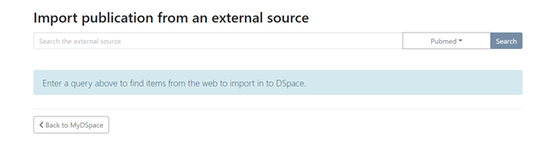
- From the MyDSpace page a new submission can be started not only using the submission form but also automatically populating metadata, importing them from several online services.
- After choosing the external source to import from and inserting a term in search bar, the system will show the list of matching results.
- When selecting an item, the system will display the metadata to be imported, according to the configured mapping.
- Clicking on “Start submission” the system will display the submission forms filled with the imported metadata.
Submitting starting from bibliographic file
- From the MyDSpace page, drag & drop the bibliographic file (e.g. bibtex, endnote, etc) onto the file dropbox
- Select the collection to submit to
- Submission will be created, with the metadata parsed out of that bibliographic file. The bibliographic file will also be attached as a Bitstream (in case some fields could not be successfully parsed). You can choose to keep it or delete it.
More Information
More information on configuring metadata mappings for various import formats / services can be found in the Live Import from external sources documentation. See the "Editing Metadata Mapping" section.