Before to proceed with the development of DSpace, you need some software requirements: Installing DSpace#BackendRequirements (stop at the deploy feature, because we don't need to deploy anything  ).
).
All the files listed in this guide should be placed inside the .idea/runConfigurations folder to be recognized by IntelliJ.
Note that you may need to customize some variables for your specific environment.
The SpringBoot feature will allow to execute the application right inside your IDE without the need to deploy it.
This is the run configuration that you can import inside your IDE that encapsulate all the steps listed here: DSpace.xml
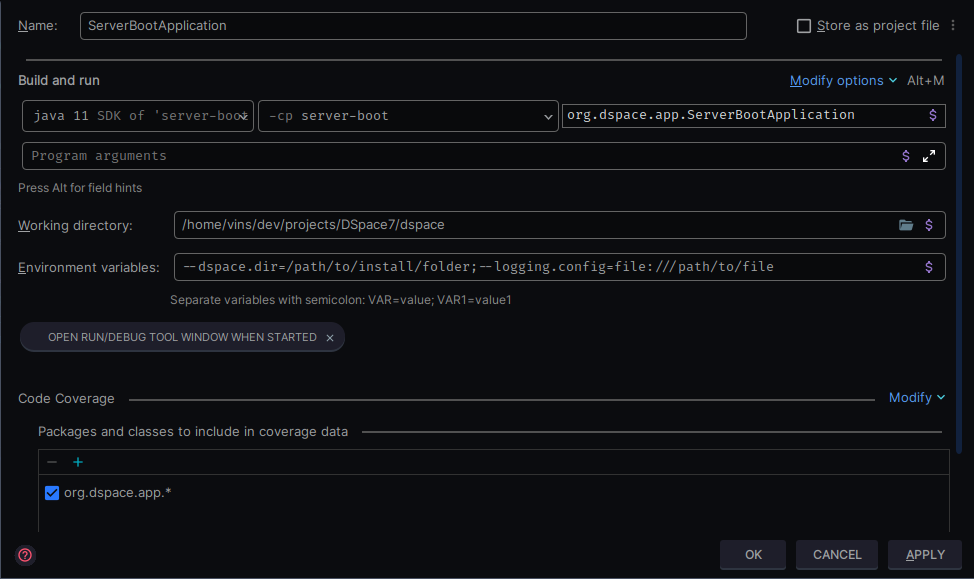
To run DSpace with SpringBoot directly in your favorite IntelliJ IDE version, you just need to configure it as a standard Java Application.
Configure standatd Java application configuration: (Run -> Edit Configurations)
Add a new configuration ( + or Alt+Insert) of Application type.
Check that the JDK selected is Java 11
Check that the classpath (-cp) argument is set correctly with the server-boot project
org.dspace.app.ServerBootApplicationCheck that you have correctly placed the dspace.dir (path of directory where dspace is installed) and logging.dir (logging configuration) environment variables:
--dspace.dir={path-to-install-dir};--logging.config=file://{path-to-logging-file} |
3. Congratulations  !
!
Now you should have a running configuration that is using SpringBoot, just press on RUN  !
!
The maven builder can be used also to execute DSpace with a special goal, that will use the spring runner.
Here you can find the resumed configuration file that you can place in your project folder : DSpace - server-boot.run.xml
To run DSpace with Maven directly in your favorite IntelliJ IDE version, you just need to configure it as a maven goal
Locate the pom.xml file of the server-boot project
Right click, and check for Run As Maven Build or just the Maven entry
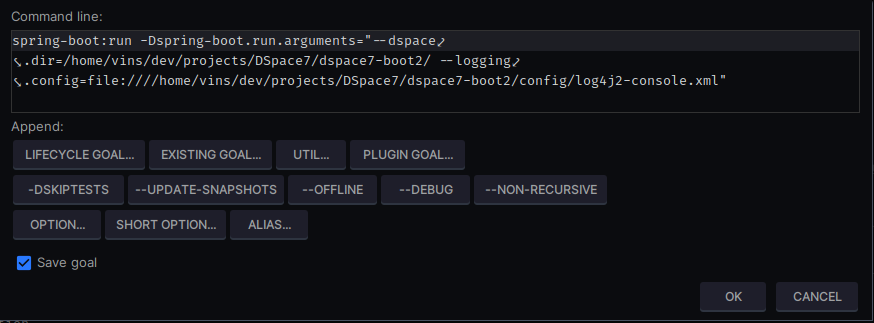
Find or type the maven goal: spring-boot:run (inside the plugin-goal list)
Optional - You can override the parameters by using the command-line parameter -Dspring-boot.run.arguments.
Here is resumed the full command line instructions that will be used by the IDE (including extra parameters)
mvn spring-boot:run -Dspring-boot.run.arguments="--dspace.dir=/path/to/install/folder/ --logging.config=file:///path/to/install/folder/config/log4j2-console.xml |
Maven, just press on RUN 🤞!