While in previous versions of DSpace CRIS, output-related entities were modeled through specific data structures, in DSpace CRIS all the entities are modeled as DSpace items.
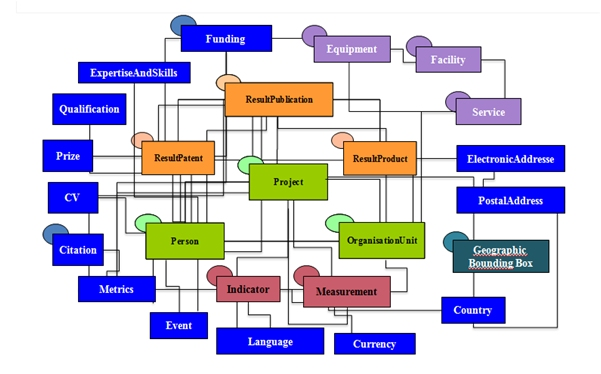
The distinction between result-items (publications, products, patents) and CRIS entities items is made through the use of the metadata dspace.entity.type that will hold the type of Entity that the item represent whether it's a result entity, a base entity, a 2nd level entity or an infrastructure entity according to the CERIF entity classification.
Entity metadata
Starting from DSpace-CRIS collections are used to configure different entities; therefore, you can relate each collection with one of the entities defined within the repository. DSpace-CRIS allows also to relate a single entity with more than one submission form; so the user has to choose also the submission type the collection will be associated to. Each entity can be, therefore related with multiple metadata structures, according to needs of the different institutions.
An Entity in DSpace-CRIS can be described using metadata from different schemas. Institutions are free to add more metadata and schemas to their installation to meet local needs. To keep easier the reuse of the configuration fragments between different installations, allowing a more easy maintenance and share of customizations, the following practice is usually followed:
the dublin-core schema (dspace/config/registries/dcterms-types.xml) is preferred when the metadata is available to express a specific concept, also instead of a more specific metadata in other schema, such as the name in the Person schema.org, because the Dublin Core is the DSpace default schema and all the configurations out-of-box are built on it
a schema.org for additional attributes specific of an entity that have been already standardized in Schema.org, for instance the https://schema.org/Person, https://schema.org/Organization or others. Such schema are named schema-<entity>-types.xml (i.e. dspace/config/registries/schema-person-types.xml)
the OpenAIRE literature v4 schema for metadata described in the guidelines and not available in the above schemas
the OpenAIRE CRIS schema for metadata described in the guidelines and not available in the above schemas
a DSpace-CRIS entity specific schema for any further attributes of common usage.
Other than the descriptive metadata the platform also use some feature specific metadata from specific schema
eperson-types.xmlused for DSpace account and group managementrelationship-types.xmlused for entity characterizationdspace-types.xmlused by DSpace standard features (i.e. configurable entities, process execution)cris-types.xmlused for DSpace-CRIS additional features such as the object owner, the sourceId of imported records, etc.
Institutions are welcome to add their own schema to manage additional semantic or technical metadata. We recommend to create a separate schema for feature specific metadata based on the name of the project, such as perucris-types.xml. The out-of-box empty local-types.xml file can be used for descriptive metadata
How to manage relationships between items
The relationships between items are managed in DSpace-CRIS via the Authority Framework. In the dspace configuration it is possible to configure which metadata relates one dspace item to another dspace item or to external records. When the relationship is managed internally, i.e between dspace items the uuid of the linked item is stored as authority value in the metadata holding the relationship from the source item. For instance, given a publication Item A the metadata dc.contributor.author will have the value “Mario Rossi” and the authority of such metadata value will be the UUID of a Person Item B that represents the person “Mario Rossi”.
Relationships in DSpace-CRIS are always implicitly bidirectional with one preferred side that will be used to actually store the data.
The side holding the relationship is usually identified as the one that changes more frequently compared to the other or the one that usually is created later. For instance to store the “author” relationship between publication - person it is better to use metadata in the publication record so that when new publications are added to the system for an existing person only the new publication record is touched and there is no need to edit also the person record. The same operations will be performed to the “investigator” relationship between project - person (the information will be stored in the project metadata) or the “affiliation” relationship between person - organisation (the information will be stored in the person metadata).
ItemAuthority are configured using the authority.cfg file; a configuration example is shown below:
plugin.named.org.dspace.content.authority.ChoiceAuthority = \
 org.dspace.content.authority.ItemAuthority = AuthorAuthority,\
 org.dspace.content.authority.ItemAuthority = AuthorAuthority,\
 org.dspace.content.authority.ItemAuthority = DataSetAuthority,\
 org.dspace.content.authority.ItemAuthority = JournalAuthority,\
 org.dspace.content.authority.ItemAuthority = OrgUnitAuthority,\
 org.dspace.content.authority.ItemAuthority = ProjectAuthority,\
 org.dspace.content.authority.ItemAuthority = PublicationAuthority,\
 ...

cris.ItemAuthority.AuthorAuthority.relationshipType = Person
cris.ItemAuthority.DataSetAuthority.relationshipType = Product
cris.ItemAuthority.JournalAuthority.relationshipType = Journal
cris.ItemAuthority.OrgUnitAuthority.relationshipType = OrgUnit
cris.ItemAuthority.ProjectAuthority.relationshipType = Project
cris.ItemAuthority.PublicationAuthority.relationshipType = Publication

choices.plugin.dc.contributor.author = AuthorAuthority
choices.presentation.dc.contributor.author = lookup
authority.controlled.dc.contributor.author = true

...
From this configuration we can understand that the metadata dc.contributor.author is linked to an AuthorAuthority and to a Person type entity, while the metadata dc.relation.project is linked to ProjectAuthority and to a Project type entity.
When relations are used to drive specific features or business workflows such as correction requests, selected list of objects, etc. In this case, relations are driven by DSpace relations framework.
