All Versions
DSpace Documentation
| Warning |
|---|
Work in progress |
DSpace introduces the item edit in submission mode, in addition to the administrative edit functionalityThe new Edit menu option allows administrators to open a submission form populated with the existing metadata of an archived item.
| Table of Contents |
|---|
This modality is accessible from the item details page for the items that have been configured with the dynamic layout of DSpace.
In the item details page, one or more menu entries are shown within the context menu..
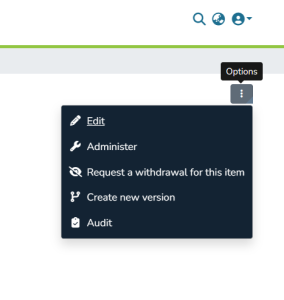

The menu entry name shown in the dropdown is configurable with an i18n label on the Angular side. The label key is context-menu.actions.edit-item.btn.<configuration_name>, where <configuration_name> must be replaced with the name of the edit configuration. For more details, read the "Edit Modes Configuration" paragraph.
to configure one or more edit modalities for a specific entity type is necessary add the configuration in the property editModesMap of bean org.dspace.content.edit.service.impl.EditItemModeServiceImpl inside edititem-service.xml file.
...
In an instance without edit modes configuration the property editModesMap is configured as follow:
|
The editModesMap property is a Map that has as key the entity type name (in lowercase) and (optional) a submission definition, and as value a list of edit modes:
...
.
dspace/config/spring/api/edititem-service.xmlDefine edit modes for each entity type:
<bean class="org.dspace.content.edit.service.impl.EditItemModeServiceImpl">
...
<property name="editModesMap">
...
        <map>
            <entry key="publication
...
">
                <list>
                    <bean class="org.dspace.content.edit.EditItemMode">
...
<property name="name"
...
value="
...
FULL"...
 />
                        <property name="security">
                            <value type="org.dspace.content.
...
security....
CrisSecurity">
                                ITEM_ADMIN
                            </value>
                        </property>
                        <property name="submissionDefinition"
...
value="publication-edit
...
"...
 />
                    </bean>
                </list>
            </entry>
            <entry key="person">
                <list>
                    <bean class="org.dspace.content.edit.EditItemMode">
...
<property name="name"
...
value="
...
FULL"...
 />
                        <property name="
...
security"...
value="
...
ITEM_ADMIN" />
                        <property name="submissionDefinition"
...
value="
...
admin-person-edit" />
                    </bean>
                    <bean class="org.dspace.content.edit.EditItemMode">
...
<property name="name"
...
value="
...
OWNER"...
 />
                        <property name="security"
...
 value="OWNER" />
                        <property name="submissionDefinition"
...
value="person-edit
...
"...
Edit lookup logic checks for <entity>.<submission_definition> where <submission_definition> is the submission defined for the collection who the Item to be edited belongs. In case no matches are found, a fallback on the entry with key <entity> is done.
...
 />
                    </bean>
                </list>
            </entry>
            <entry key="funding">
                <list>
                    <bean class="org.dspace.content.edit.EditItemMode">
...
<property name="name"
...
value="
...
FULL"...
 />
                        <property name="
...
security"...
value="
...
ITEM_ADMIN" />
                        <property name="submissionDefinition" value="funding-edit" />
                    </bean>
                    <bean class="org.dspace.content.edit.
...
Either a single property named security or a list of securities are admitted. This second case applies when the same edit item mode must be made available according to different policies on the item to be edited:
...
EditItemMode">
                        <property name="name" value="INVESTIGATOR" />
                        <property name="security" value="CUSTOM" />
                        <property name="submissionDefinition" value="funding-edit" />
                        <property name="items">
                            <list>
                                <value>crisfund.investigators</value>
                            </list>
                        </property>
                    </bean>
                </list>
            </entry>
        </map>
    </property>
</bean>
As you can see, an edit mode is represented by class org.dspace.content.edit.EditItemMode, this class has follow properties:
name: this is a unique identifier for the edit mode at entity type level;
label: this is an optional property, if is valorized the UI will use its value as i18n key otherwise the UI will use the value of name property;
submissionDefinition: contains the name of the submission definition to use with the current edit mode;
securities: define the security levels available for the current edit mode and its visibility. It must be set with a list of “security” values.
security (alternative to “securities”): defines the security level for the current edit mode and its visibility. This property is an Enum (org.dspace.content.edit.EditItemMode) and accepts one of the following values:
ADMIN: this value allows only the Administrator to use this edit mode
OWNER: this value allows only the item owner to use this edit mode
SUBMITTER: this value allows the Submitter of the Item to use this edit mode
SUBMITTER_GROUP: this value allows all users in the the group of submitters of the Item owner to use this edit mode
CUSTOM: this value is used to define a fine-grained security access. This security level is explained in following paragraph
GROUPS: this value is used to define a fine-grained security access to users belonging to a group. This security level is a shortcut for “CUSTOM” value with access policies to be evaluated only according to what defined in “groups” node.
ALL: always allowed access, it should be used in pair with custom additional Filter (see in “Additional Filter” paragraph).
Either a single property named security or a list of securities are admitted. This second case applies when the same edit item mode must be made available according to different policies on the item to be edited
ITEM_ADMIN: Only item administratorsOWNER: Item owner onlyCUSTOM: Based on metadata fields (e.g., investigators, editors)GROUP: Specific user groupANONYMOUS: All users...